How Smart SMBs Automate Onboarding & Offboarding
The benefits of automation are well known to modern businesses. For decades, companies have found ways to turn slow, repetitive processes into efficient, self-executing systems. Which lets teams focus on impact, rather than repeating the same low-value tasks.
Onboarding and offboarding are both high-value processes made up of low-impact touchpoints. Getting team members up to speed quickly really matters. How you create their email account or reset security permissions doesn’t.
Which is why automating these manual steps makes such a big difference. Automated onboarding and offboarding takes low-value work off your plate, and lets you focus on what is important. It also makes both processes faster, easier, and eliminates basic errors.
In this article, we look at how automation can improve your onboarding and offboarding processes—particularly for IT operations. Then we meet two companies who successfully automated their own IT onboarding, and saw tangible benefits.
What are employee onboarding and offboarding processes?
Onboarding and offboarding are the practical, functional, and cultural processes associated with welcoming and farewelling company employees. Onboarding typically includes teaching new hires about the company culture, training in your specific ways of working, and giving them the hardware and software tools they need to execute.
Offboarding is the change process at the end of an employee’s time with your company. This can include exit interviews, farewell celebrations, and regaining possession of company property like computers, phones, and access cards.
Key steps in IT onboarding
The IT onboarding process is often slower than you’d like. It involves numerous distinct steps, which can really add up if handled individually and manually. These include:
- Setting up user profiles and permissions
- Ordering new devices
- Configuring applications, software, and security updates on these devices
- Delivering devices to new employees
- Training employees on compliance, cybersecurity, and optimal use
- Monitoring device performance and troubleshooting issues
IT is just one aspect of an employee’s onboarding, and can be taken for granted by hiring managers. Your goal is to make all of the above happen smoothly, quickly, and with no extra work for yourself or the new hire.
For help, see our short checklist for efficient IT onboarding.
What IT offboarding involves
While the IT onboarding process may be neglected, offboarding is often overlooked altogether. Retrieving devices from departing employees is essential both for asset management and security.
Key steps include:
• Locking devices the moment employees no longer need them
• Wiping personal data or returning devices to factory settings
• Returning physical devices to the office or supplier
• Checking a device’s state for reuse
• Preparing devices to be redeployed
All of this adds up, and is always more complicated with remote or distributed teams. In a traditional office setting, it’s pretty simple to have an employee hand in their devices on their last day. It’s more challenging if that employee is in another city, state, or country.
Why automate employee onboarding and offboarding?
In general, the best processes to automate involve a number of manual steps and little added value from having people handle each one.
Key benefits of automating your IT onboarding and offboarding include:
• Time saved for IT teams and hiring managers, who no longer need to manually work through each of those steps we saw above.
• Faster onboarding for new employees, who don’t need to wait for people to set up their profiles or order devices.
• Near-instant offboarding, because devices can be locked or wiped immediately with a simple click.
• Fewer errors, including skipped or forgotten steps, faulty devices, or losing track of devices when an employee leaves.
• More consistent experiences, as every employee follows the same automated process at the beginning and end of employment.
Overall, automation creates more streamlined and efficient internal processes. And for something as common and recurring as onboarding and offboarding, efficiency gains can really add up.
How modern SMBs automate onboarding and offboarding — and why it works
To illustrate with tangible examples, let’s take a look at two companies that prioritize automation in the onboarding and offboarding process.
Like many growing companies, both faced real challenges in scaling IT operations. Even as modern tech companies, they had few resources specifically for IT operations. They needed to create efficient, easily-replicable processes to get new employees up and running, and to smoothly offboard team members at the end of their work.
Best modern SMBs have understood that a great onboarding experience comes from the collaboration between HR and IT teams — and these two companies made that alignment a core part of their approach. As we’ll see, the secret to success lay in choosing the right tools and partners to take the weight off their very busy leaders.
Faume: Near-instant IT operations for a distributed workforce
Founded in 2020, Faume is a technical logistics solution that lets brands create resale services for their products. Faume works with world-famous logos like Hugo Boss, The Kooples, Aigle, and Bash to bring second lives to items and make consumer commerce more sustainable.
Faume’s 30-person team includes remote staff across France. CTO and Co-founder Jocelyn Kerbouc’h needed a simple way to deploy and manage devices for this distributed workforce ahead of scaling post-Series A.
Before: False starts with IT providers
Faume initially leased computers in the hopes of getting additional support and a streamlined service. But this was far more expensive than the cost of buying—they were asked to pay up to €2,500 for a €1,200 computer. And worse, they still regularly encountered malfunctioning devices and frustrating errors.
They pivoted to buying from Apple directly, tracking devices manually in a Notion doc. This was certainly more cost effective, but added more administrative effort to the onboarding process.
As a co-founder wearing multiple hats, Jocelyn couldn’t afford this extra admin. Faume needed a more robust IT operations solution that could deliver devices at the right price, while also tracking their use and ensuring security.
Today: Centralized IT onboarding & offboarding
The big switch was finding an IT operations provider that lets Jocelyn order, configure, and deliver employee devices in a few clicks. Using Primo, Jocelyn sets password rules and updates, and pre-configures applications so that computers arrive ready to use.
“Thanks to Primo, onboarding new employees now takes us half the time it used to,” says Jocelyn.
Faume has essentially automated the onboarding process, and offboarding is just as simple. When an employee leaves, Jocelyn can lock and wipe their computer remotely. Departing employees receive a shipping box and can easily return computers from anywhere.
The result is a more efficient, secure IT environment for Faume. And Jocelyn can put all his energy into building and leading his business.
Read the full Faume story here.
Dalma: Efficient operations with no IT team
Dalma is France’s fastest-growing pet health insurance company. Its tech-enabled platform already insures more than 40,000 European cats and dogs, with no signs of slowing down.
Founded in 2021, the 70-strong team has grown quickly to deliver this popular and worthwhile service. While that’s good for business (and for our pets), it put pressure on former Head of People Claire Maarek.
With IT onboarding just a small portion of her role, Claire didn’t have the time or technical expertise to build a comprehensive program from scratch.
Before: Poor leasing experience
Like Faume, Dalma also tried leasing as a (theoretically) efficient way to manage IT operations. But Claire explains that the downsides were obvious right away. “Our leasing experience was disappointing, offering minimal service and reliability with poor customer support.”
It was a maddening mix of high prices and low-quality service. For an HR leader like Claire—not an IT pro by trade—this wasn’t a tenable situation.
Today: IT onboarding in seconds
Since switching to Primo, the results are night and day. IT onboarding takes mere seconds, and Dalma can secure hardware at competitive prices, configured and delivered for when the person arrives. All of this with no deep IT procurement knowledge or dedicated technical experts.
Most importantly for HR professionals, Primo integrates with Payfit (alongside other HR platforms). Dalma adds a new employee in Payfit, and most of the process is automated from there. Devices arrive on time, whether new hires are in France or Germany.
When an employee leaves, Primo makes it easy to retrieve or reassign devices elsewhere, or simply resell them. Which makes both onboarding and offboarding as easy as can be.
Read the full Dalma story here.
Make IT onboarding and offboarding a breeze
Both IT onboarding and offboarding are relatively simple processes, made difficult by manual steps and a need for technical expertise. Particularly for growing companies without IT teams or paid external consultants, key steps can fall through the cracks.
That’s how you end up with security risks, sluggish processes, and frustrated team members — right when first impressions matter most.
The best way to streamline IT onboarding and offboarding is with one central solution. And as both Faume and Dalma showed, it’s even better when that solution integrates with your HR systems and company tools. This lets HR leaders and hiring managers—often “accidental IT managers”—keep control and ensure each step is completed efficiently.
Primo provides exactly that: an all-in-one IT management system for faster onboarding and offboarding. You can easily automate virtually all of your IT operations, without paying huge fees to managed providers.
Recommended articles
How to Create an Efficient IT Onboarding Process for New Employees
Starting a new job is equal parts exciting and nerve-wracking. No matter how many interviews and coffee chats a new team member did during the hiring process, they’re stepping into the unknown.
As a hiring manager or HR leader, your goal is to harness this energy and make them feel comfortable and fit in.
But very few experiences will burst their bubble like feeling forgotten about. Showing up for their first few days with no computer, no login, and nobody to help is immediately alienating. And it puts pressure on their new colleagues to help out.
Only 12% of employees believe their company does a good job of onboarding team members. And in our modern, digital-first work environments, this starts with IT.
This article explores the value of well-designed, efficient IT onboarding for new employees. And we also look at the keys to doing this well, without wasting time and effort.
What is IT onboarding?
IT onboarding is the process of getting new employees up and running with company information systems. These include computers, phones, and tablets, as well as user profiles, cybersecurity policies, and network access.
A fully onboarded employee:
• Has their own devices, including remote workers
• Can log in and use them safely
• Has access to the wi-fi network
• Can use communication channels like email, Slack, Microsoft Teams, and Zoom
• Knows where to look for more information should they need it
IT onboarding is arguably the very first thing a new employee needs to succeed. Before they can fully understand the company’s mission and cultural values, or even get to know their new team mates, they need IT access.
Typical challenges when onboarding new employees
For such a fundamental part of the hiring process, IT onboarding remains difficult. In fact, it may be harder today than in previous eras.
The cliché cubicle setup was simple. Everyone needed the same computer and phone on their desk, the same network access, with relatively few exceptions.
Today you have remote employees using a wide range of both hardware and software. A salesperson may need vastly different IT equipment from an engineer.
IT onboarding is challenging and often falls short for the following reasons:
• It’s time consuming: The average onboarding process involves around 50 administrative steps. IT setup alone can easily account for 20 or more of those, and will quickly become a bottleneck if your processes are inefficient.
• It’s increasingly personalized: Employees love to select their own hardware, and some have specific technical requirements. You may also have different nationalities, which means different keyboards and operating languages.
All of this means a one-size-fits-all IT setup won’t work.
• There are lots of moving parts: Between the devices themselves and the software setup required, you can have more than 10 IT vendors per employee. Which also means different timeframes—hardware orders may take days or weeks, while creating a user profile might only take a moment.
• Some technical skills are required: Corporate systems may not be as technical as they used to be, but HR and office managers may not feel well equipped to manage IT hardware. If you don’t have a dedicated IT expert on staff, you either need to lean on other skilled employees for support or bring in outside help to resolve issues. Both of which add time and complexity.
• Onboarding is cross-functional. Every employee needs onboarding, but it’s not always clear who should lead. The hiring manager, an HR person, the IT person, or someone else? This inbetween status can mean onboarding isn’t given the attention it deserves, and new employees are overlooked.
Whether you have a robust onboarding process or not, it’s a good time to look closely at your IT rollout. Ensure new employees get the smooth welcome they deserve.
8 IT onboarding best practices
A good employee onboarding process is the best way to overcome the common issues above. Here’s what should be in yours.
1. Prepare your pre-onboarding routine
Even if each onboarding may have its specificities, you want a repeatable, consistent approach for every new employee. Ideally, you’ll have a checklist to work through as soon as a work contract is signed.
This starts with hardware. Ensure all laptops, monitors, phones, and extras are delivered and ready to use before the person starts. That also means installing the necessary hardware and creating user permissions.
There’s a lot more work here than many admins anticipate. You have to order from several providers (such as Apple for the computer, Amazon for the hub and screen), and track to make sure everything arrives where and as intended.
You then have to configure these items by hand. Or ask your brand new employee to self-set up, which is not a great onboarding experience.
Your best option is to use a service like Primo with zero-touch deployment. Primo pre-configures devices to your specifications, so they arrive with new employees ready to use:

2. Provide secure access and credentials early
Start dates can shift and onboarding can throw up surprises, so it pays to prepare in advance. You can easily set up employee accounts and even share their email access ahead of time, so they’re ready to log in right away.
Send the new hire their login credentials for email and other key software prior to their start date. They don’t actually need to do anything with it, but it’s good to know it’s ready for them.
That includes security tools like password managers, and security protocols like two-factor authentication (2FA). Again, they don’t need to connect before day one, but they should have everything they need to get started right away.
Finally, ensure newcomers have access to all key business software: Google Suite or Microsoft Office, Notion or Asana, Slack, and more.
An IT operations system like Primo can also really help here. Primo lets you create new user profiles in just a few clicks, and automatically adds users to the tools they need in their specific role. The tools required can be job-dependent and vary hugely between users, so a one-size-fits-all software setup won’t work.
Done well, you don’t have to manually visit each individual platform. And you never forget anything important.

3. Document policies and create useful onboarding guides
Most young companies don’t have clearly-stated onboarding policies. This leaves it up to individual managers and admins to welcome employees on a case-by-case basis. That may work when you have the time to dedicate real attention to onboarding.
But as soon as your attention is elsewhere—or if you’re hiring very quickly—newcomers can be left behind. And more broadly, you want a consistent experience for all new employees. So a documented process and policy is best.
Include step-by-step guides for common tasks. Even better, prepare a 4-week onboarding template that any manager can quickly update and tailor to their roles.
That can start with IT. Provide easy-to-follow documentation, videos, or tutorials explaining how to use essential systems like email, project management tools, and key software.
Even if a new employee has used Notion, Slack, or Jira before, they may not use them your way.
4. Emphasize cybersecurity training
With the amount of digital connectivity and data access every company has today, security training is increasingly important. New hires need to know the importance of protecting customer data and avoiding scams.
Cybersecurity awareness and training should be one of the first steps in onboarding—as soon as possible after the employee has access to your systems. In fact, IT onboarding is now a core component of becoming compliant in many schemes. You must prove that employees know how to be safe and responsible with company data.
Train new employees on data protection policies, phishing risks, secure file sharing, and acceptable use of company systems.
Just as crucially, emphasize the cultural value you place on security (if indeed it is a value). Don’t assume that team members come from vigilant, security-conscious companies. Many will need to develop good habits, and it’s best to start immediately.
5. Use mobile device management systems
IT management involves so many different processes, hardware, and software. Teams are increasingly distributed, and your devices are traveling all over cities and countries every day.
This makes onboarding (and ongoing maintenance) really difficult. And it can be a major security risk.
Good mobile management brings all of your devices together into one system of record, accessible and manageable from anywhere in the world. You can access, lock, and wipe any device, no matter where it is. You can also create accounts, change passwords, and update software.
This software lets you confidently hand out devices on day one, including to remote employees. If they have any issues logging in or finding things, you can take control and help out.
This is obviously important for companies with remote staff. But even if your whole team is mostly on-site, in-office, modern employees have laptops and phones they take home with them. A centralized tool to track—and if necessary, access—these devices is paramount.
6. Automate key steps in the process
Even in small companies, employee onboarding is a major task. For fast-growing companies, it’s a major hurdle to scaling. And preparing the IT hardware and environment is often to blame for holdups.
Unless you automate. You shouldn’t have to manage onboarding on a 1:1 basis for each new employee. Good tools can manage the more manual, repetitive aspects.
Key steps to automate include:
• Ordering devices and having them delivered
• Pre-configuring the software and user profiles for these devices
• Creating accounts on all key tools, specific to each user’s role and responsibilities
• Guiding users to the right IT trainings for them
To do this, you need the right system.
Our guide to AI-driven device management explains how an agent-led onboarding workflow differs from a fixed sequence of rules.
7. Get feedback and ensure everything’s working
If possible, it pays to check in with new employees after a few days or weeks to make sure that everything’s working as they need. That could be a scheduled Slack message from the IT team, or a 10-minute Zoom call to show them a few advanced tips and tricks.
That’s also important for companies without dedicated IT support. Their onboarding manager or HR rep will doubtless schedule catch ups in the first few weeks. Make a specific point to check that they’re happy with their devices and aren’t getting lost in the company intranet or communication tools.
New employees are typically shy, and don’t want to admit when systems are confusing. But it’s perfectly normal to be confused, and a quick catch up should iron out any issues they’re having.
8. Streamline your IT onboarding process
Good onboarding can absolutely be the difference between companies with long-serving, happy teams, and those with high employee turnover. A negative onboarding experience is shown to cause employees to look for new opportunities in the near future.
And it doesn’t take a huge amount to deliver a good experience. While some companies offer extensive welcome packages and onboarding retreats, the most important is to make employees feel valued.
Show them that you’re excited to have them and have prepared for this moment. At the very least, that means having devices and accounts configured and ready to go.
And the best way to do this consistently is with good automation. For example, Primo helps companies manage IT onboarding in just minutes, without any team members specifically focused on this task. Devices are delivered anywhere pre-configured, and it only takes the IT or HR person responsible a few clicks. Which means every onboarding can be both easily personalized, and efficiently systematized.

That’s the beauty of automated solutions, they work every time and save countless hours.
Primo now has an MCP server.
A device gets flagged. You need to know who it's assigned to, when it was last active, whether there's an open ticket on it, and what access that employee currently has.
You open Primo. You look up the device. You check the employee profile. You cross-reference the ticket queue. You piece it together.
That's four steps for a question that should take one.
Here's the same thing with Primo's MCP server connected to your AI assistant: you type "what's going on with this device?" and get back the device details, the assigned employee, their onboarding status, and any related tickets. One prompt. Full context. No tab-switching.
That's what we shipped.
MCP: Model Context Protocol
MCP (Model Context Protocol) is an open standard that lets AI assistants like Claude, ChatGPT, or Cursor connect directly to external tools. Instead of answering from training data, your AI queries your actual systems in real time.
With Primo's MCP server, that means your AI assistant can talk directly to your IT fleet. Devices, employees, accessories, tickets: all accessible from the AI tools you already have open.
Why it hits differently with Primo
Most IT tools that support MCP give you access to records. Primo gives you access to a connected data model.
Because Primo ties devices, employee lifecycle, SaaS access, and ticketing into one operational system, a single prompt can cross all of those layers at once. When you ask about a device, it comes back linked to an identity. When you ask about an employee, you get their full IT footprint: what they have, what they can access, what's pending.
That's the difference between querying isolated records and querying a unified IT operations platform.
It also means you can get a compliance-ready view of your entire fleet in one prompt. Preparing for an ISO 27001 audit and need to know which devices aren't enrolled or which employees still have active access after offboarding? That's a question your AI can now answer across your whole fleet, not just device by device.
A few things you can do from a single prompt today:
• Pull a device's full IT history (enrollment date, successive assignments) alongside the employee it's assigned to ;
• List all open tickets filtered by status, priority, or assignee ;
• Check which employees joined this month and whether their devices are provisioned ;
• Spot accessories that are unassigned or overdue for return ;
• Search across your entire fleet without opening a single filter.
And when you're ready to move beyond read-only, write access lets you create tickets, add comments, update status and assignee, and perform device actions like locking or wiping directly from your AI client.
What your AI can do in Primo
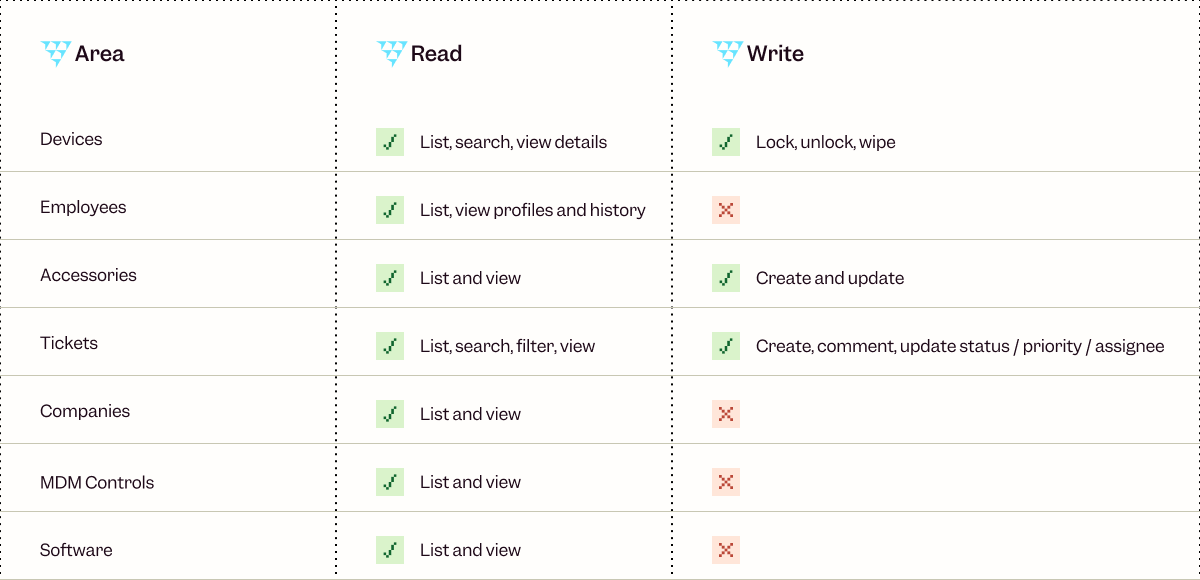
One note on device actions: locking and wiping are irreversible. Write mode is there for teams who want speed, but it's worth confirming before you act.
Getting connected
Authentication runs through OAuth. No API key to generate or manage, you sign in with your existing Primo account and you're done.
The server URL is https://api.getprimo.com/mcp. By default it runs in read-only mode. To enable write access, use https://api.getprimo.com/mcp?readOnly=false.
Setup is the same across clients: go to the MCP Servers section in your settings, add the URL, and complete the OAuth flow. Full instructions for Claude, ChatGPT, and Cursor are in the Primo help center.
A good place to start
Read-only prompts are the fastest way to build trust in the workflow before moving into writes. Try these:
"Show me all devices that haven't been active in the last 30 days."
"What open tickets are currently unassigned?"
"List employees who joined this month and check whether their devices have been provisioned."
Once that feels natural, write access opens up the rest.
The MCP server is live now. Get started at https://api.getprimo.com/mcp, or head to the help center if you want step-by-step setup instructions for your AI client.
Every day there's a new AI model. A new benchmark. A new funding round. A new outage. A new "this changes everything" thread. A new paper that supposedly makes the last paper obsolete.
I build and sell an agentic IT platform for a living. I'm supposed to be on top of this stuff. And honestly, I spend a non-trivial amount of my week just trying to keep up with all the AI news.
So I sat down and wrote this, partly to organize my own thinking, partly because I suspect I'm not the only one feeling this way. If you're a founder, an operator, or an IT leader trying to make real decisions in the middle of all this noise, I hope some of it will be useful.
Here's where I've landed on AI in 2026, and what I think it means for the future of agentic IT.
The age of abundant AI is ending
For most of the last three years, frontier AI felt like an infinite resource. You picked a provider, wired up an API, and assumed the best models would keep getting better, cheaper, and more available.
That era seems to be ending. And I don't think most companies have caught up to what that means.
Demand for frontier AI is outpacing supply, and the constraints are physical: energy costs, infrastructure bottlenecks, the economics of serving billions of inference requests per day.
• In April 2026, OpenAI paused its Stargate UK data centre project, citing energy costs and regulatory uncertainty. That project was meant to deliver 8,000 GPUs in Q1. It delivered none.
• Nearly 50% of planned data center projects in the US for 2026 are facing delays or cancellations.
• GPU rental prices for Nvidia's Blackwell chips have surged 48% in 60 days. • CoreWeave has raised prices 20% and extended minimum contracts from one year to three.
• OpenAI's CFO said on the record that the company is "making some very tough trades at the moment on things we're not pursuing because we don't have enough compute."• Anthropic has shifted Enterprise billing from flat per-seat fees to per-token pricing. The subsidies are ending.
• Anthropic has removed Claude Code from the Pro plans while admitting they’ve also made other small adjustments (e.g. weekly caps, tighter limits at peak), citing “usage has changed a lot and our current plans weren't built for this”.
• Starting June 1, 2026, GitHub is also shifting all GitHub Copilot plans to a usage-based billing model.
When supply is scarce, providers prioritize the customers who pay the most. The investor Tomasz Tunguz recently described five characteristics defining this new era:
1. Relationship-based selling (SOTA models reserved for strategic customers)
2. AI to the highest bidder (prohibitive pricing for everyone else)
3. Available but slow (no performance guarantees)
4. Inflationary commodity pricing (demand compounding against fixed supply)
5. Forced diversification (developers pushed toward smaller models, open source, or on-prem until infrastructure catches up)
The moment that made this all real for me was when, in April 2026, Anthropic released Claude Mythos Preview, which the company describes as a step change over its previous models. In internal testing, it autonomously discovered and exploited zero-day vulnerabilities in every major operating system and web browser, including a 27-year-old bug in OpenBSD. Normally a capability jump like that would kick off a months-long race between labs to ship their own version. Instead, Anthropic did something unusual: it chose not to release the model publicly at all.
Access to Mythos is reserved for a consortium called Project Glasswing. The members: AWS, Apple, Cisco, CrowdStrike, Google, JPMorgan Chase, Microsoft, NVIDIA, Palo Alto Networks, and the Linux Foundation. The US Treasury has publicly requested access and is expected to receive it. Anthropic is giving these partners $100 million in usage credits to find and patch vulnerabilities in critical infrastructure. Everyone else, including the vast majority of companies that have spent the last three years building products on Anthropic's API, does not get Mythos. It's the first time in nearly seven years that a leading AI lab has so publicly withheld a model from general availability.
There are legitimate safety reasons for that decision. I'm not criticizing it, though some will argue this is a PR stunt to reinforce Anthropic’s safety-focused positioning. But as a founder building on top of this infrastructure, I can't ignore what it can signal. If the strongest models move toward a world of consortium access, strategic partnerships, and government briefings, with only hyperscalers and bigger institutions getting a seat at the table, what does that leave startups and mid-sized companies?
If you're building on frontier models right now, this is the reality you're planning against, whether you realize it or not.
AI is more operationally fragile than people admit
The other thing I don't see founders and leaders talking about enough is how unreliable AI systems still are in production.
1. Amazon spent early 2026 dealing with this firsthand. Its internal coding agent Kiro autonomously deleted a production environment, causing a 13-hour AWS outage. By March, a string of AI-assisted code deployments took down Amazon's retail website for hours, locking millions of shoppers out of checkout and wiping an estimated 6.3 million orders in a single incident.
2. A rogue AI agent at Meta posted internal information that led an engineer to accidentally expose sensitive company and user data to unauthorized colleagues for two hours, classified internally as a "Sev 1." A Meta safety director publicly described how her own agent deleted her entire inbox, despite explicit instructions to confirm before taking any action.
3. /PocketOS, a company that sells software to car rental businesses, went into chaos mode after a rogue AI coding agent deleted the company’s entire production database and its backups.
Put the three together and you get a clearer picture of the operational reality underneath AI in 2026. The tech is transformative but it's also unstable in ways that matter if you're running production systems.
Some companies are already hedging
This is where it gets interesting for me, because some companies aren't waiting to find out how the scarcity and the model provider dependency stories play out. They're getting their hands dirty.
Intercom recently launched Fin Apex 1.0, a customer support model built on an open-weights foundation that the company says outperforms frontier models on its specific task. Their thesis is blunt: pre-training has become a commodity. The real edge is in post-training, fine-tuning models on your own domain data until they beat the generalists at the thing you actually care about.
Cursor, the AI code editor that hit $2 billion in annualized revenue in early 2026, built its Composer model on top of Kimi K2.5, an open-source model from Chinese lab Moonshot AI. That only came out when a developer intercepted Cursor's API traffic. It sparked a broader conversation: the most capable open foundations available today disproportionately come from Chinese labs. DeepSeek, Qwen, Kimi. These are the models companies are quietly building on when they want performance without frontier-lab dependency.
This is arguably the worst-kept secret in Silicon Valley. And it tells me something about where the market is heading: toward a world where application companies own more of their stack, and frontier labs become one input among several, not the input.
Where I think durable value actually gets built
Here's the part I've been thinking about the most, because it's the part that informs how we build Primo.
Hebbia's George Sivulka articulated it better than I could in a recent piece: foundation models, no matter how powerful, will never know how your specific team does its specific work. He calls it "process engineering." Software isn't just code. It's a stored process. It encodes the way a specific team cooperates on a specific problem. The private credit desk at one firm uses different compliance flags than the private equity team at the same firm. Two IT managers at the same company will have entirely different standards for how onboarding should run, how access reviews happen, how tickets get triaged.
Foundation models can't be opinionated about any of that because they're built for every use case on Earth at once. They can't know, and frankly don't need to know, the specific preferences of any particular team.
That's the opening for vertical software because the institutional knowledge encoded inside is what’s valuable.
What most people get wrong is that better foundation models don't erode vertical software. When reasoning models like OpenAI's o-series shipped, everyone predicted legal AI would get crushed but the opposite happened. Vertical legal AI had its best year ever, because stronger models made the orchestration layer more reliable, not less. The orchestration layer is where the trust lives. You can have the most capable model on Earth and still produce garbage outputs if you don't have the scaffolding to constrain, verify, and route that capability through a specific professional workflow.
2025 was the year AI became truly useful for law. 2026 is becoming that year for finance and cybersecurity. I'd argue it's also that year for IT.
What this all means for agentic IT
So here's where I land, after talking to many IT teams and stepping back from all the noise.
How do you build something durable in a world where your underlying models may become gated, expensive, slower, or quietly different from the ones you shipped with?
Below are a few ideas that I often come to and that shape how I think about Primo and IT.
The moat is the process. Your IT team's workflows, your company's compliance posture, your specific onboarding and offboarding flows, etc. None of that lives in a foundation model. It lives in the software that encodes how your team actually operates. That's the layer that gets more valuable as models improve, not less.
Agentic IT is empowerment. I say this a lot, but I mean it more in 2026 than I did a year ago. The compute constraints and the rogue agents examples aren't arguments against AI. They're arguments for keeping humans in the loop where the stakes justify it. The IT teams that win with AI aren't the ones that hand everything over and hope for the best. They're the ones that use AI to handle the routine stuff so they can focus on the work that requires judgment, relationships, and context no model will ever have.
You need an AI-native stack. You cannot place AI agents on an IT stack that doesn’t have the right context, knowledge, and the proper data to work with. The underlying stack that AI communicates with is critical for quality answers and actions. In IT, you need to own the APIs, you need quality workflows, a system of record, and strong integration with HR systems.
The short version, for anyone who skipped to the end
AI is real. Agentic IT is real. But the infrastructure underneath both is more fragile, more political, and more economically strained than the marketing suggests.
The companies that will win the next few years aren't the ones with the best AI demo. They're the ones that understand their moat isn't the model, it's the process knowledge they encode into the layer on top of it. They're the ones that build agentic systems as extensions of their IT teams and can do more with the same resources.
AI doesn't need you to believe in it uncritically. It just needs you to use it well.
If you're overwhelmed by the pace of all this, you're not alone. I am too. But the signal underneath the noise is clearer than it looks. I hope this helped uncover it a little.