AI Device Management: What It Is and How It Works
"AI device management." "AI-powered MDM." "AI endpoint management." Every device-management vendor has stamped one of these on the box in the last eighteen months, and most of the time it's the same console you already had with a chat box bolted into the corner. So if you run IT and you've started seeing "AI" in front of every tool in your stack, a little fatigue is fair. Most of it is paint.
But picture the part of fleet management nobody enjoys. Once a month you pull the compliance report on your 500-odd devices, Mac, Windows, a drawer of iPhones, and find the drift: forty machines behind on patches, a handful where disk encryption silently stopped reporting, two with the firewall off. None of it is hard to fix. All of it is steps. And you spend the next two days chasing stragglers one console at a time. Your MDM showed you the problem perfectly. It just didn't do anything about it.
So what is the real thing underneath the marketing? AI device management is software that runs your device fleet toward outcomes you set, keeping every laptop and phone enrolled, secure and supported, instead of only executing the rules you configured by hand. You hand it the goal, "every Mac encrypted and current on patches," and it works out which devices need what and carries it out: it pushes the fix, remediates the stragglers, opens a ticket for the one it can't resolve, and checks with you before anything risky. Classic MDM runs the policy you designed. An AI system decides which policy each device needs and applies it, including for the cases you never scripted.
For a lean team running 50 to 2,000 devices across macOS, Windows, Linux, iOS and Android, that's the difference between operating a fleet by hand and delegating the running of it to something that already knows your environment.
This guide covers what AI device management actually means, how it differs from traditional MDM, the four levels of "AI" you'll meet on vendor sites (and which one is worth paying for), what it looks like in practice, and how to tell a real system from a rebadged chatbot when you evaluate one.
What AI device management actually means
Strip the marketing and AI device management is the application of an AI agent, a system that perceives a situation, decides on an action and carries it out, to the work of managing a fleet of devices. Three things separate the real thing from "MDM with a chat box":
- It reads the live state of your fleet continuously, every device's posture, patch level and identity, rather than a monthly export you have to go pull
- It acts within the permissions you set, enrolling a device, pushing a fix, remediating a drifted setting or revoking access, rather than surfacing a dashboard and leaving the doing to you
- It works across the device lifecycle and the systems around it, procurement, MDM, identity and the help desk, rather than stopping at one tool's edge
This is the same shift covered in our guide to agentic IT, the broader move from rule-following automation to goal-driven agents, applied specifically to the devices your team owns.
AI device management vs. traditional MDM
MDM (mobile device management) and its broader sibling UEM (unified endpoint management) aren't new. They've pushed policies, profiles and scripts to devices for years. The difference isn't whether the platform automates. It's who designs the path.
- Traditional MDM runs a path you defined: you build the policy, scope the device group, write the remediation script. It's deterministic and reliable, and brittle, because every new device type, OS update or edge case needs a new rule, and coverage is exactly as wide as the rules you maintain
- AI device management is handed the destination and works out the path: told "keep every device encrypted and current," it figures out which machines have drifted, picks the right action per OS, adapts when something changes, and asks for help when it's unsure
In practice you want both. MDM is the floor, the enrollment engine and the auditable, predictable policy push. AI device management is the layer above it that decides which policies and scripts to fire, on which devices, in what order, and what to do when reality doesn't match the plan. It doesn't replace your MDM. It runs it.
The four levels of AI in device management
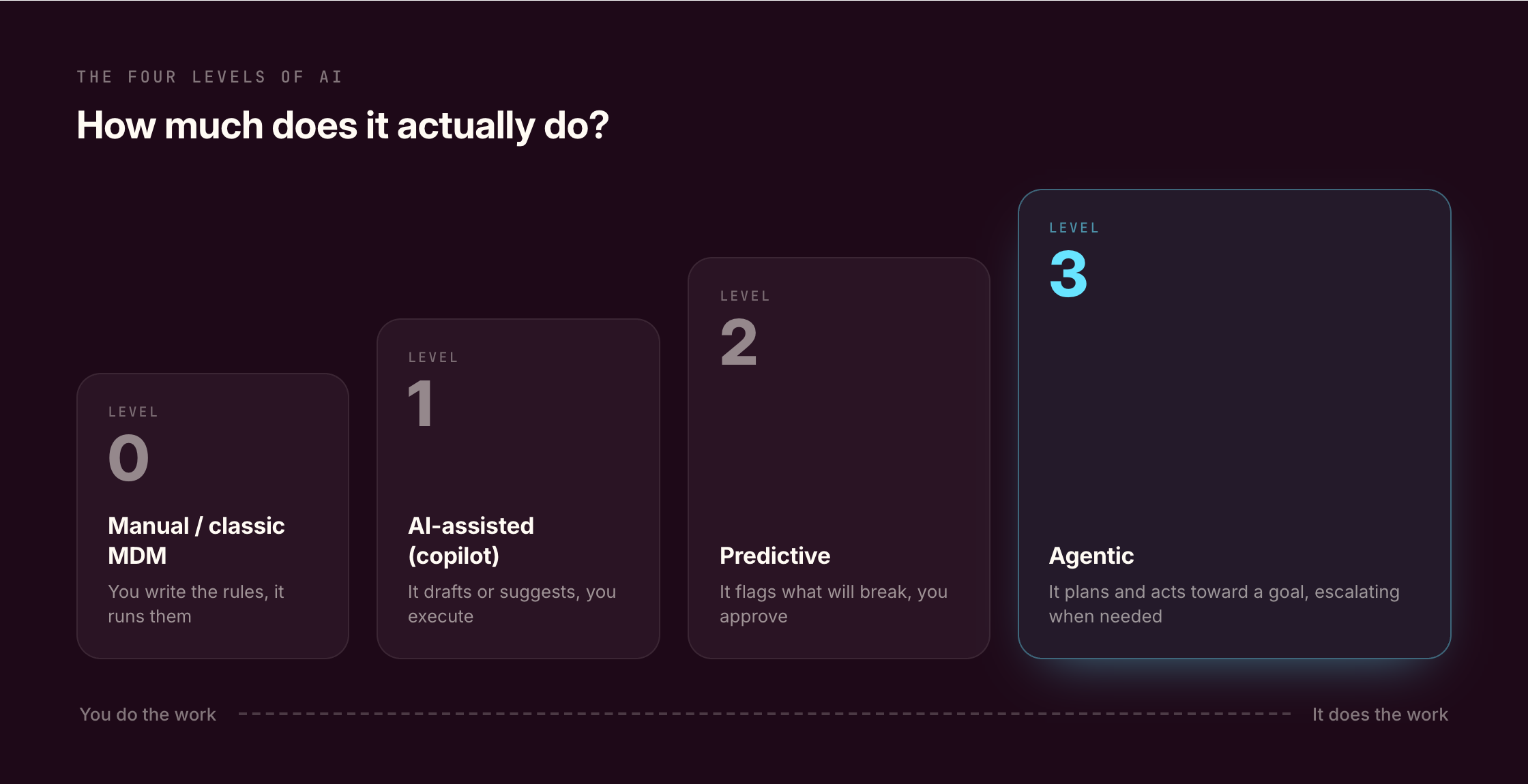
"AI" on a device-management site can mean four very different things. This ladder is the fastest way to cut through a demo: work out which level a tool actually reaches before you weigh anything else.
- Level 0, Manual / classic MDM. You write the policies and scripts and the platform pushes them on schedule. Dependable and fully under your control, but every new case is a new rule you author and maintain
- Level 1, AI-assisted (copilot). A chat assistant drafts a script, answers a documentation question or summarizes a device's status, and you still run whatever it suggests. It's advisory, and it's where most tools marketed as "AI device management" actually sit today
- Level 2, Predictive. The system reads fleet telemetry (the health and status signals your devices report) to predict what's about to break, a cohort drifting out of compliance, a patch wave to schedule, and recommends the fix while a human approves and executes
- Level 3, Agentic. Given a goal, the agent plans and executes across the lifecycle within guardrails, runs the full onboarding chain, remediates the common issues end to end, and escalates the rest. The human owns approvals and the audit trail, not the clicking
The honest read: Levels 1 and 2 are genuinely useful and most of the market is there. But the work that actually leaves your week, the chasing and the multi-step grind, only goes away at Level 3. When you evaluate, the question isn't "does it have AI?" It's "what level, and does that level remove work or just narrate it?"
What AI device management looks like in practice
Start with the workflow most teams would happily never touch again: onboarding and offboarding. A new hire lands in your HRIS (the HR system of record) and that single event sets the chain running, ordering or assigning the machine, enrolling it, applying the role's policies, installing the apps and provisioning the accounts. When someone leaves, the same chain runs in reverse, so no device or access is left open. (Our guide to the IT onboarding process walks through that workflow in full.)
Then take the compliance drift from the top of this article. Instead of you pulling a monthly report and chasing forty machines, the agent watches device posture across the fleet, catches the encryption setting that stopped reporting or the cohort falling behind on patches, and fixes what it can before any of it becomes a ticket or an audit finding.
And when you just need an answer, you ask in plain language, "which macOS devices are unpatched?" or "who still has a device without encryption?", and it answers from the live state of the fleet rather than a spreadsheet that went stale the day you built it.
The common thread is multi-OS work that's repetitive and spread across systems, which is exactly where a lean team running Mac, Windows and mobile across remote devices pays the steepest manual tax today.
[Visual: short clip of the agent running]
How to evaluate AI device management
The category is young and the labels are loose. Five questions cut through almost any pitch:
- Does it act, or only suggest? Many "AI" features are a chat box that drafts a script you still run yourself (Level 1). Ask what it does autonomously across the fleet and what stays human-approved
- What's the human-in-the-loop model? A trustworthy agent keeps you in control of what it does on its own, asks permission before risky actions, and gives you an audit trail of every change it made to every device. Autonomy without that trail is a liability, not a feature
- Is it wired to your HR data? The highest-leverage device actions are triggered by people events, joins, moves and leaves. A system connected to your HRIS acts on the real trigger; one that isn't waits for a ticket
- Are multi-OS, identity and procurement all in scope? If you run Mac and Windows and mobile, a tool that understands one OS, or only devices and not the accounts and hardware behind them, leaves half the work manual
- Does it span the whole lifecycle, or one slice? The compounding value comes from one agent that reaches across procurement, MDM, identity and support, not a single AI feature bolted onto patching or ticket triage
Worth saying plainly: this isn't always the right tool. If you're an MSP (a provider running IT for many client companies), an RMM-first platform (remote monitoring and management) like Atera or NinjaOne is built for that shape. If you're Apple-only and want maximum depth on one platform, Kandji (now Iru) or Mosyle will go further on macOS than a multi-OS generalist. If you're a large enterprise whose core need is service-desk automation at scale, ServiceNow or Moveworks play that game. And if you genuinely just need reliable, predictable policy push, a classic MDM like Intune or Jamf is a fine floor, and you may not need the agentic layer yet.
What AI device management is not
A few honest boundaries, because they're where trust is won or lost.
It isn't about firing IT and letting a bot run the fleet. It's leverage for the team you have, taking the repetitive multi-step work off their plate, not the judgment.
It isn't a black box, either. A credible system shows what it decided, why, and what it changed on each device. If you can't audit it, you shouldn't give it production access.
And it isn't unbounded autonomy. The agent only ever works inside the permissions and approval gates you set, and the good ones make those gates easy to see and adjust.
How Primo approaches AI device management
Primo is the IT control layer for modern companies, bringing MDM, SaaS management, ticketing and device procurement into one place and connecting them to your HR data. Its AI agent is the Level 3 layer that runs on top. A few things make the approach specific rather than a chat box on a console.
It's wired to HR data, so joins, moves and leaves trigger the right device and account actions instead of waiting for a ticket.
It's end to end, reaching across procurement, enrollment, configuration, install and support rather than automating a single slice of the lifecycle.
It's genuinely multi-OS, with identity and procurement in scope, built on real integrations with Entra ID, Okta, Google Workspace, SCIM and your HRIS, not invented ones.
And it's open: Primo exposes an MCP (Model Context Protocol) server, so any AI assistant can query your fleet's state directly, which few device-management vendors offer.
You can see how the agent sits inside the wider platform on the Primo MDM page. If you want to watch one run a real device workflow end to end, explore Primo's AI agent or book a demo.
Frequently asked questions
What is AI device management?
AI device management is software that runs a fleet of devices toward goals rather than following fixed rules. Given an objective, like keeping every device encrypted and current on patches, an AI agent reads the live state of the fleet, decides what each device needs, and acts across enrollment, configuration, security and support, escalating to a human when needed. It's also called AI MDM or AI endpoint management.
How is AI device management different from traditional MDM?
Traditional MDM pushes the policies and scripts you defined in advance to the device groups you scoped, and needs a new rule for every new case. AI device management is handed the outcome and works out which devices need which actions itself, adapting to cases you didn't pre-script and asking for approval when it's unsure. Most teams use both: MDM as the reliable enrollment-and-policy floor, an AI agent as the layer that decides what to run and when.
Is AI device management the same as AI MDM?
Effectively yes. "AI device management," "AI MDM" and "AI endpoint management" are used interchangeably for the same idea: applying an AI agent to the work of enrolling, securing and supporting a fleet of devices. "Device management" is the broadest term because it spans laptops, desktops and mobile across every OS, plus the identity and procurement around them.
Does AI device management replace MDM?
No. It's a layer above MDM, not a replacement for it. You still need an enrollment-and-policy engine to push configuration to devices. The AI layer decides which policies and remediations to run, on which devices, and handles the cases your rules don't cover. Think of MDM as the floor and the agent as the operator working on top of it.
What should a small IT team look for in an AI device management tool?
Whether it acts or only suggests, a clear human-in-the-loop and audit model so every device action is reviewable, a connection to HR data so it acts on real people-events, multi-OS plus identity and procurement in scope rather than one OS or devices-only, and whole-lifecycle coverage instead of a single slice like patching or ticket triage.
Is AI device management secure?
A credible system is built around guardrails: it acts only within the permissions you set, asks for approval before risky actions, and keeps an audit trail of every change it made to every device. The risk isn't autonomy itself, it's autonomy without visibility, so the thing to insist on is that you can see and adjust what the agent does on its own.