IT Onboarding Process: How to Manage Tools & Software for New Employees
How to Create an Efficient IT Onboarding Process for New Employees
Starting a new job is equal parts exciting and nerve-wracking. No matter how many interviews and coffee chats a new team member did during the hiring process, they’re stepping into the unknown.
As a hiring manager or HR leader, your goal is to harness this energy and make them feel comfortable and fit in.
But very few experiences will burst their bubble like feeling forgotten about. Showing up for their first few days with no computer, no login, and nobody to help is immediately alienating. And it puts pressure on their new colleagues to help out.
Only 12% of employees believe their company does a good job of onboarding team members. And in our modern, digital-first work environments, this starts with IT.
This article explores the value of well-designed, efficient IT onboarding for new employees. And we also look at the keys to doing this well, without wasting time and effort.
What is IT onboarding?
IT onboarding is the process of getting new employees up and running with company information systems. These include computers, phones, and tablets, as well as user profiles, cybersecurity policies, and network access.
A fully onboarded employee:
• Has their own devices, including remote workers
• Can log in and use them safely
• Has access to the wi-fi network
• Can use communication channels like email, Slack, Microsoft Teams, and Zoom
• Knows where to look for more information should they need it
IT onboarding is arguably the very first thing a new employee needs to succeed. Before they can fully understand the company’s mission and cultural values, or even get to know their new team mates, they need IT access.
Typical challenges when onboarding new employees
For such a fundamental part of the hiring process, IT onboarding remains difficult. In fact, it may be harder today than in previous eras.
The cliché cubicle setup was simple. Everyone needed the same computer and phone on their desk, the same network access, with relatively few exceptions.
Today you have remote employees using a wide range of both hardware and software. A salesperson may need vastly different IT equipment from an engineer.
IT onboarding is challenging and often falls short for the following reasons:
• It’s time consuming: The average onboarding process involves around 50 administrative steps. IT setup alone can easily account for 20 or more of those, and will quickly become a bottleneck if your processes are inefficient.
• It’s increasingly personalized: Employees love to select their own hardware, and some have specific technical requirements. You may also have different nationalities, which means different keyboards and operating languages.
All of this means a one-size-fits-all IT setup won’t work.
• There are lots of moving parts: Between the devices themselves and the software setup required, you can have more than 10 IT vendors per employee. Which also means different timeframes—hardware orders may take days or weeks, while creating a user profile might only take a moment.
• Some technical skills are required: Corporate systems may not be as technical as they used to be, but HR and office managers may not feel well equipped to manage IT hardware. If you don’t have a dedicated IT expert on staff, you either need to lean on other skilled employees for support or bring in outside help to resolve issues. Both of which add time and complexity.
• Onboarding is cross-functional. Every employee needs onboarding, but it’s not always clear who should lead. The hiring manager, an HR person, the IT person, or someone else? This inbetween status can mean onboarding isn’t given the attention it deserves, and new employees are overlooked.
Whether you have a robust onboarding process or not, it’s a good time to look closely at your IT rollout. Ensure new employees get the smooth welcome they deserve.
Lorem ipsum
Lorem ipsum
Lorem ipsum
Lorem ipsum
8 IT onboarding best practices
A good employee onboarding process is the best way to overcome the common issues above. Here’s what should be in yours.
1. Prepare your pre-onboarding routine
Even if each onboarding may have its specificities, you want a repeatable, consistent approach for every new employee. Ideally, you’ll have a checklist to work through as soon as a work contract is signed.
This starts with hardware. Ensure all laptops, monitors, phones, and extras are delivered and ready to use before the person starts. That also means installing the necessary hardware and creating user permissions.
There’s a lot more work here than many admins anticipate. You have to order from several providers (such as Apple for the computer, Amazon for the hub and screen), and track to make sure everything arrives where and as intended.
You then have to configure these items by hand. Or ask your brand new employee to self-set up, which is not a great onboarding experience.
Your best option is to use a service like Primo with zero-touch deployment. Primo pre-configures devices to your specifications, so they arrive with new employees ready to use:

2. Provide secure access and credentials early
Start dates can shift and onboarding can throw up surprises, so it pays to prepare in advance. You can easily set up employee accounts and even share their email access ahead of time, so they’re ready to log in right away.
Send the new hire their login credentials for email and other key software prior to their start date. They don’t actually need to do anything with it, but it’s good to know it’s ready for them.
That includes security tools like password managers, and security protocols like two-factor authentication (2FA). Again, they don’t need to connect before day one, but they should have everything they need to get started right away.
Finally, ensure newcomers have access to all key business software: Google Suite or Microsoft Office, Notion or Asana, Slack, and more.
An IT operations system like Primo can also really help here. Primo lets you create new user profiles in just a few clicks, and automatically adds users to the tools they need in their specific role. The tools required can be job-dependent and vary hugely between users, so a one-size-fits-all software setup won’t work.
Done well, you don’t have to manually visit each individual platform. And you never forget anything important.

3. Document policies and create useful onboarding guides
Most young companies don’t have clearly-stated onboarding policies. This leaves it up to individual managers and admins to welcome employees on a case-by-case basis. That may work when you have the time to dedicate real attention to onboarding.
But as soon as your attention is elsewhere—or if you’re hiring very quickly—newcomers can be left behind. And more broadly, you want a consistent experience for all new employees. So a documented process and policy is best.
Include step-by-step guides for common tasks. Even better, prepare a 4-week onboarding template that any manager can quickly update and tailor to their roles.
That can start with IT. Provide easy-to-follow documentation, videos, or tutorials explaining how to use essential systems like email, project management tools, and key software.
Even if a new employee has used Notion, Slack, or Jira before, they may not use them your way.
4. Emphasize cybersecurity training
With the amount of digital connectivity and data access every company has today, security training is increasingly important. New hires need to know the importance of protecting customer data and avoiding scams.
Cybersecurity awareness and training should be one of the first steps in onboarding—as soon as possible after the employee has access to your systems. In fact, IT onboarding is now a core component of becoming compliant in many schemes. You must prove that employees know how to be safe and responsible with company data.
Train new employees on data protection policies, phishing risks, secure file sharing, and acceptable use of company systems.
Just as crucially, emphasize the cultural value you place on security (if indeed it is a value). Don’t assume that team members come from vigilant, security-conscious companies. Many will need to develop good habits, and it’s best to start immediately.
5. Use mobile device management systems
IT management involves so many different processes, hardware, and software. Teams are increasingly distributed, and your devices are traveling all over cities and countries every day.
This makes onboarding (and ongoing maintenance) really difficult. And it can be a major security risk.
Good mobile management brings all of your devices together into one system of record, accessible and manageable from anywhere in the world. You can access, lock, and wipe any device, no matter where it is. You can also create accounts, change passwords, and update software.
This software lets you confidently hand out devices on day one, including to remote employees. If they have any issues logging in or finding things, you can take control and help out.
This is obviously important for companies with remote staff. But even if your whole team is mostly on-site, in-office, modern employees have laptops and phones they take home with them. A centralized tool to track—and if necessary, access—these devices is paramount.
6. Automate key steps in the process
Even in small companies, employee onboarding is a major task. For fast-growing companies, it’s a major hurdle to scaling. And preparing the IT hardware and environment is often to blame for holdups.
Unless you automate. You shouldn’t have to manage onboarding on a 1:1 basis for each new employee. Good tools can manage the more manual, repetitive aspects.
Key steps to automate include:
• Ordering devices and having them delivered
• Pre-configuring the software and user profiles for these devices
• Creating accounts on all key tools, specific to each user’s role and responsibilities
• Guiding users to the right IT trainings for them
To do this, you need the right system.
Our guide to AI-driven device management explains how an agent-led onboarding workflow differs from a fixed sequence of rules.
7. Get feedback and ensure everything’s working
If possible, it pays to check in with new employees after a few days or weeks to make sure that everything’s working as they need. That could be a scheduled Slack message from the IT team, or a 10-minute Zoom call to show them a few advanced tips and tricks.
That’s also important for companies without dedicated IT support. Their onboarding manager or HR rep will doubtless schedule catch ups in the first few weeks. Make a specific point to check that they’re happy with their devices and aren’t getting lost in the company intranet or communication tools.
New employees are typically shy, and don’t want to admit when systems are confusing. But it’s perfectly normal to be confused, and a quick catch up should iron out any issues they’re having.
8. Streamline your IT onboarding process
Good onboarding can absolutely be the difference between companies with long-serving, happy teams, and those with high employee turnover. A negative onboarding experience is shown to cause employees to look for new opportunities in the near future.
And it doesn’t take a huge amount to deliver a good experience. While some companies offer extensive welcome packages and onboarding retreats, the most important is to make employees feel valued.
Show them that you’re excited to have them and have prepared for this moment. At the very least, that means having devices and accounts configured and ready to go.
And the best way to do this consistently is with good automation. For example, Primo helps companies manage IT onboarding in just minutes, without any team members specifically focused on this task. Devices are delivered anywhere pre-configured, and it only takes the IT or HR person responsible a few clicks. Which means every onboarding can be both easily personalized, and efficiently systematized.

That’s the beauty of automated solutions, they work every time and save countless hours.
Recommended articles

A new hire’s Day One says everything about how your company runs. If their laptop is on the table, configured, logged in, with the right apps installed — they feel set up. If the laptop is still in a courier’s warehouse and IT is scrambling to provision SSO — they feel like an afterthought, in their first six hours.
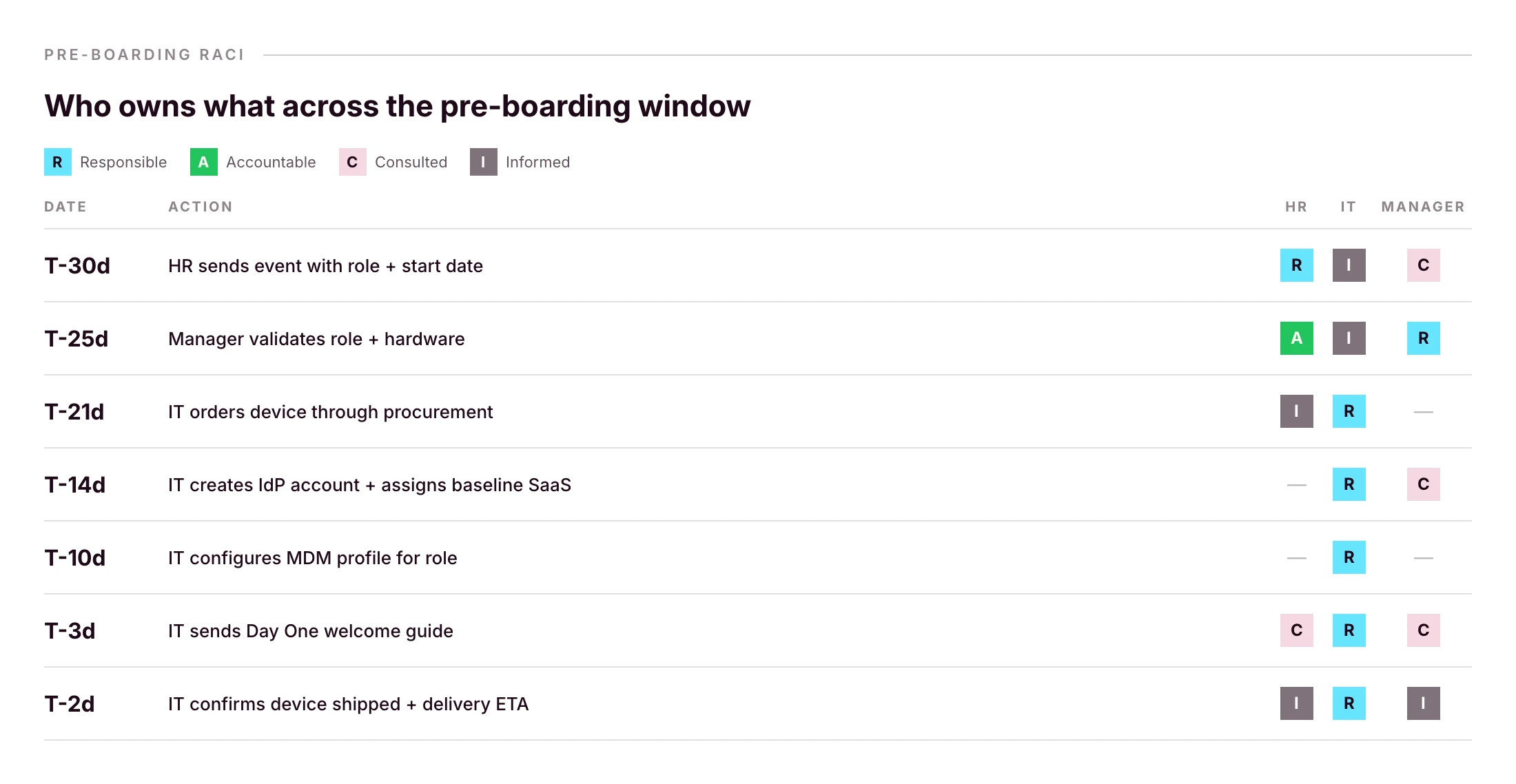
This is the IT onboarding checklist lean teams actually use. Five phases, RACI ownership, HRIS-triggered, mirrored for offboarding. Use it as your operating playbook, not a static doc.

The five phases, at a glance
- Pre-boarding (weeks -4 to -1): order the device, create the IdP account, provision baseline SaaS by role, configure the device for delivery.
- Day One: device delivery, SSO login, MFA enrollment, EDR check, Acceptable Use Policy signature.
- Week One: verify every tool works, complete cybersecurity training, schedule first manager check-in.
- First 30 days: audit installed apps against role profile, document additional access requests, validate everything still works.
- Offboarding parity: set up the reverse workflow on Day One, not on exit day.
Each phase has owners, a timeline, and a measurable outcome. Done well, the whole flow runs in the background of an HRIS event. IT only gets pinged on exceptions.
Phase 1: Pre-boarding (weeks -4 to -1)
Most IT onboarding problems are pre-boarding problems. If the laptop is ordered late, Day One can’t be saved. If the IdP account is missing, the SSO chain breaks on first login.
HR-to-IT handoff (intake trigger)
The trigger should be the HRIS event, not a Slack message, not a calendar invite. The minimum payload IT needs to act:
- Full legal name and preferred name
- Start date and timezone
- Role and department
- Manager
- Work location and shipping address
- Hardware preference (if you offer choice)
If you’re capturing this in a Notion form or a Slack thread, you’re one departing teammate away from a gap. Make the HRIS the source of truth and pipe events into your IT workflow tool.
Order the device for direct-to-employee delivery
The window from order to first power-on is the most expensive part of IT onboarding when it goes wrong. Lead times for the EU vary by hardware and reseller; for international hires, add a week for customs.
The right pattern: order through a procurement workflow that ships the device pre-configured directly to the employee. If your platform supports zero-touch deployment, through Apple Business Manager or Windows Autopilot, the device finds your MDM automatically on first power-on, with no IT touch between order and Day One. Primo’s procurement workflow covers 60+ countries with delivery in around 5 business days, with apps and security pre-configured before shipping.
Create the user record in your IdP
Identity is the spine of everything that follows. The IdP account (Microsoft Entra ID, Google Workspace, JumpCloud, your federated IdP of choice) is what every SSO-enabled app will check against. Create it as soon as the HRIS event fires, not on Day One morning.
Provision baseline SaaS access by role
Group memberships in your IdP should map to roles, not individuals. “Designer” gets Figma, Notion, Slack, the design Drive. “Sales Rep” gets HubSpot, Gong, Slack, the sales Drive. Maintain the matrix once; reuse it for every hire.
Phase 2: Day One
A well-run Day One feels boring to IT and magical to the new hire. That’s the goal.
Device delivery and unboxing
If pre-boarding was done right, the new hire receives a sealed box, powers it on, connects to Wi-Fi, and watches the device configure itself. No IT presence required. This is the payoff of zero-touch deployment, and it’s the single most visible signal that your company runs operationally.
First login and SSO verification
The first login should be against your IdP. The new hire enters their company email, completes the IdP flow, and lands on a configured desktop. If they have to type a separate password into anything besides the IdP, your SSO chain has a gap. Fix it before Day One, not after.
MFA enrollment
Enroll the new hire into MFA during the first session. Use a phishing-resistant method (passkey, hardware key, or platform authenticator) wherever your IdP supports it. SMS-based MFA is below the line in 2026. Keep it as a fallback for account recovery only.
EDR agent and security policy check
Endpoint Detection and Response (EDR) should be installed by your MDM as part of the configuration push, not by the user. Verify in the admin console that the agent is reporting healthy before the new hire opens their first customer call. While you’re there, confirm disk encryption (FileVault, BitLocker), firewall, and idle-lock are all green.
Acceptable Use Policy signature
Push the AUP as part of the Day One flow, captured digitally with timestamp. Same for the phishing-awareness module assignment. This is the boring half of compliance, and the half that pays back during your next audit.
Phase 3: Week One and first 30 days
The first week is verification. The next 30 days is calibration.
In Week One, confirm every tool the new hire needs actually works: VPN, conferencing, email signature, calendar permissions, shared drive access, and the second-tier apps that came through the role profile. Schedule the first manager check-in for end-of-week-one, not later. Complete the cybersecurity training module.
In the first 30 days, audit the installed apps against the role profile and document every additional access request that came in. If a single role is generating 10+ ad-hoc access tickets in month one, the role profile is wrong, not the workflow. Fix the profile, not the ticket.
Use your HRIS as the trigger, not a spreadsheet
The single biggest upgrade you can make to IT onboarding isn’t a better checklist. It’s connecting your HRIS so the checklist runs itself.
When a new hire is created in an HRIS like BambooHR, HiBob, Factorial, Eurécia, Deel, Dayforce, Charlie, ADP or Gusto, the right remote device management platform should:
- Create the IdP account
- Order the device through the procurement workflow
- Pre-register the device to the OEM portal where supported
- Assign role-based MDM and SaaS policies
- Send the Day One welcome guide
- Alert IT only if something needs human intervention
This is the model behind Primo’s IAM page summary: “HR triggers it. Primo executes it.” Events flow from HR’s source of truth straight into device, identity and access workflows.
The win isn’t only speed. It’s parity: every new hire gets the same baseline, regardless of whether IT was busy that week.
Provision software and access by role, not app by app
If you’re provisioning SaaS access one app at a time, per hire, you’ve already lost the next ten hours.
The discipline that scales: define role profiles once, then map every new hire to a role. The role determines the apps, the permissions inside those apps, and the IdP groups they belong to.
Apply the Principle of Least Privilege as defined by NIST: each role gets only what’s needed to do the job. Run access reviews quarterly to catch role drift.
A minimal role-profile matrix:
- Designer: Figma, Notion, Slack, Drive. Editor on design assets, viewer elsewhere.
- Sales Rep: HubSpot, Gong, Slack, Drive. CRM rep view + own pipeline.
- Engineer: GitHub, Linear, Slack, Drive, AWS. Repo write on owned projects, AWS dev only.
Role profiles also make offboarding meaningful — you know exactly what to revoke, because you defined it once when you hired the role. Primo surfaces this directly as “Role-Based Access Control (RBAC) across every app”.
Procurement is part of onboarding
This is the part of IT onboarding most checklists skip, and most lean IT teams quietly burn weekend hours on.
A flawless Day One can’t recover from a laptop that arrives late, arrives unconfigured, or arrives at the wrong address. Procurement isn’t a separate vertical. It’s the first stage of onboarding.
For a lean IT team in 2026, procurement should cover:
- Sourcing through authorized resellers (so OEM zero-touch works where supported)
- International shipping with customs handled
- Pre-configuration before the box ships
- Asset tracking from purchase order through delivery
- Return labels generated automatically for the eventual offboarding
If your current setup is “IT lead orders devices manually, ships from home, types serial numbers into a spreadsheet” — that’s the part of the workflow with the highest return on automation. Primo’s procurement workflow handles this end-to-end: “From order to delivery, Primo ships, configures, and tracks every device automatically.”
Build one checklist for onboarding and offboarding
The most expensive part of offboarding isn’t the wipe. It’s the SaaS account nobody owned that quietly retains access for six months.
Every line on your onboarding checklist needs a mirror on your offboarding checklist. Build them at the same time, not on exit day.
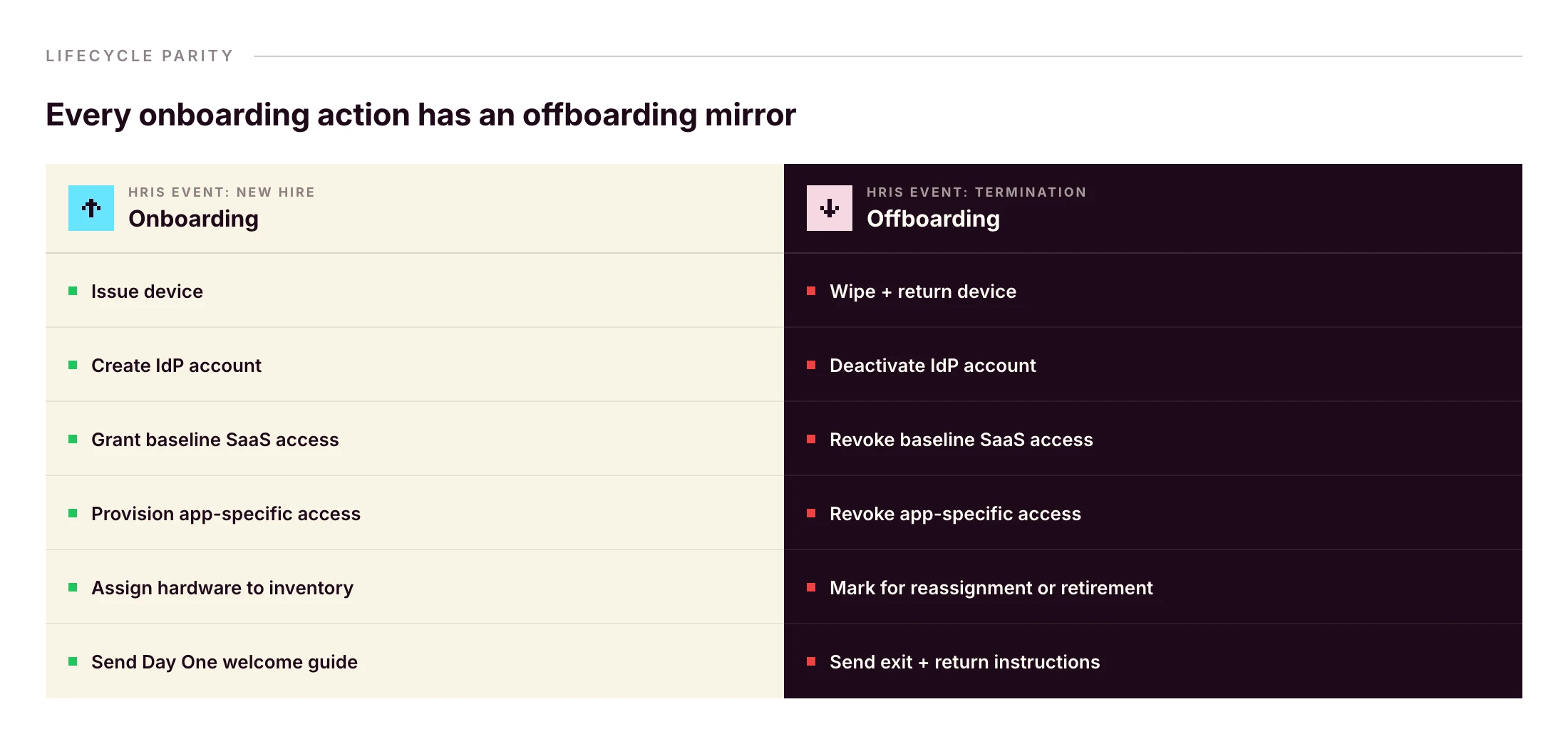
The same HRIS event that started onboarding can fire offboarding. Primo runs this as “Zero forgotten access. Ever. From first day to last, every account, seat, and permission is managed automatically.” and “Revoked automatically on their last day to prevent security breach.”
Without that pattern, a wiped laptop doesn’t reclaim Slack, Google Workspace, HubSpot, or Stripe. Identity and device have to be revoked together — same workflow, same trigger.
Frequently asked questions
What should be on an IT onboarding checklist?
A complete IT onboarding checklist covers pre-boarding (hardware ordering, account creation in the HRIS and IdP, baseline SaaS provisioning), Day One (device delivery, SSO login, MFA setup, EDR install, acceptable use policy signature), and the first 30 days (training, tool verification, access audits). It should also establish offboarding parity from day one.
What is the difference between IT onboarding and HR onboarding?
HR onboarding covers contracts, payroll, benefits, culture and orientation. IT onboarding covers everything the new hire needs to work on Day One: hardware, accounts, applications, security setup and policies. In practice the two should be triggered from the same HRIS event so they stay in sync.
When should IT onboarding start?
IT onboarding should start at least two to four weeks before the new hire’s first day. That window covers hardware ordering and shipping, account creation in the IdP, baseline SaaS provisioning, and any zero-touch deployment configuration. For remote international hires, add another one to two weeks for customs and delivery.
What does a new hire need on Day One?
A configured laptop, working SSO login, MFA enrolled, email and chat access, calendar synced, role-based app access, an installed EDR agent, and a signed acceptable use policy. They also need a working manager check-in and a help channel for IT issues.
How do you onboard a remote employee?
Ship a pre-configured device using zero-touch deployment. Trigger account creation from the HRIS so credentials are ready on Day One. Provide a written Day One guide. Schedule a video onboarding call with IT and the manager. Verify SSO, VPN and MFA remotely. Set up a clear escalation channel for first-week issues.
How long should IT onboarding take?
Pre-boarding spans two to four weeks. Day One setup should take under an hour for the employee if zero-touch deployment is in place. The full onboarding cycle, including training, access audits and role validation, typically runs 30 days. Anything longer suggests manual handoffs in the IT-HR workflow.
Who is responsible for IT onboarding?
On lean teams responsibility is shared: HR or the hiring manager triggers the workflow, IT executes provisioning, and the manager validates role-specific access. A RACI matrix prevents gaps. On smaller teams without a dedicated IT person, an HR or office operations lead often owns the IT onboarding workflow.
See an HRIS-triggered onboarding flow that handles device, identity and access from one console, with offboarding parity built in.
The benefits of automation are well known to modern businesses. For decades, companies have found ways to turn slow, repetitive processes into efficient, self-executing systems. Which lets teams focus on impact, rather than repeating the same low-value tasks.
Onboarding and offboarding are both high-value processes made up of low-impact touchpoints. Getting team members up to speed quickly really matters. How you create their email account or reset security permissions doesn’t.
Which is why automating these manual steps makes such a big difference. Automated onboarding and offboarding takes low-value work off your plate, and lets you focus on what is important. It also makes both processes faster, easier, and eliminates basic errors.
In this article, we look at how automation can improve your onboarding and offboarding processes—particularly for IT operations. Then we meet two companies who successfully automated their own IT onboarding, and saw tangible benefits.
What are employee onboarding and offboarding processes?
Onboarding and offboarding are the practical, functional, and cultural processes associated with welcoming and farewelling company employees. Onboarding typically includes teaching new hires about the company culture, training in your specific ways of working, and giving them the hardware and software tools they need to execute.
Offboarding is the change process at the end of an employee’s time with your company. This can include exit interviews, farewell celebrations, and regaining possession of company property like computers, phones, and access cards.
Key steps in IT onboarding
The IT onboarding process is often slower than you’d like. It involves numerous distinct steps, which can really add up if handled individually and manually. These include:
- Setting up user profiles and permissions
- Ordering new devices
- Configuring applications, software, and security updates on these devices
- Delivering devices to new employees
- Training employees on compliance, cybersecurity, and optimal use
- Monitoring device performance and troubleshooting issues
IT is just one aspect of an employee’s onboarding, and can be taken for granted by hiring managers. Your goal is to make all of the above happen smoothly, quickly, and with no extra work for yourself or the new hire.
For help, see our short checklist for efficient IT onboarding.
What IT offboarding involves
While the IT onboarding process may be neglected, offboarding is often overlooked altogether. Retrieving devices from departing employees is essential both for asset management and security.
Key steps include:
• Locking devices the moment employees no longer need them
• Wiping personal data or returning devices to factory settings
• Returning physical devices to the office or supplier
• Checking a device’s state for reuse
• Preparing devices to be redeployed
All of this adds up, and is always more complicated with remote or distributed teams. In a traditional office setting, it’s pretty simple to have an employee hand in their devices on their last day. It’s more challenging if that employee is in another city, state, or country.
Why automate employee onboarding and offboarding?
In general, the best processes to automate involve a number of manual steps and little added value from having people handle each one.
Key benefits of automating your IT onboarding and offboarding include:
• Time saved for IT teams and hiring managers, who no longer need to manually work through each of those steps we saw above.
• Faster onboarding for new employees, who don’t need to wait for people to set up their profiles or order devices.
• Near-instant offboarding, because devices can be locked or wiped immediately with a simple click.
• Fewer errors, including skipped or forgotten steps, faulty devices, or losing track of devices when an employee leaves.
• More consistent experiences, as every employee follows the same automated process at the beginning and end of employment.
Overall, automation creates more streamlined and efficient internal processes. And for something as common and recurring as onboarding and offboarding, efficiency gains can really add up.
How modern SMBs automate onboarding and offboarding — and why it works
To illustrate with tangible examples, let’s take a look at two companies that prioritize automation in the onboarding and offboarding process.
Like many growing companies, both faced real challenges in scaling IT operations. Even as modern tech companies, they had few resources specifically for IT operations. They needed to create efficient, easily-replicable processes to get new employees up and running, and to smoothly offboard team members at the end of their work.
Best modern SMBs have understood that a great onboarding experience comes from the collaboration between HR and IT teams — and these two companies made that alignment a core part of their approach. As we’ll see, the secret to success lay in choosing the right tools and partners to take the weight off their very busy leaders.
Faume: Near-instant IT operations for a distributed workforce
Founded in 2020, Faume is a technical logistics solution that lets brands create resale services for their products. Faume works with world-famous logos like Hugo Boss, The Kooples, Aigle, and Bash to bring second lives to items and make consumer commerce more sustainable.
Faume’s 30-person team includes remote staff across France. CTO and Co-founder Jocelyn Kerbouc’h needed a simple way to deploy and manage devices for this distributed workforce ahead of scaling post-Series A.
Before: False starts with IT providers
Faume initially leased computers in the hopes of getting additional support and a streamlined service. But this was far more expensive than the cost of buying—they were asked to pay up to €2,500 for a €1,200 computer. And worse, they still regularly encountered malfunctioning devices and frustrating errors.
They pivoted to buying from Apple directly, tracking devices manually in a Notion doc. This was certainly more cost effective, but added more administrative effort to the onboarding process.
As a co-founder wearing multiple hats, Jocelyn couldn’t afford this extra admin. Faume needed a more robust IT operations solution that could deliver devices at the right price, while also tracking their use and ensuring security.
Today: Centralized IT onboarding & offboarding
The big switch was finding an IT operations provider that lets Jocelyn order, configure, and deliver employee devices in a few clicks. Using Primo, Jocelyn sets password rules and updates, and pre-configures applications so that computers arrive ready to use.
“Thanks to Primo, onboarding new employees now takes us half the time it used to,” says Jocelyn.
Faume has essentially automated the onboarding process, and offboarding is just as simple. When an employee leaves, Jocelyn can lock and wipe their computer remotely. Departing employees receive a shipping box and can easily return computers from anywhere.
The result is a more efficient, secure IT environment for Faume. And Jocelyn can put all his energy into building and leading his business.
Read the full Faume story here.
Dalma: Efficient operations with no IT team
Dalma is France’s fastest-growing pet health insurance company. Its tech-enabled platform already insures more than 40,000 European cats and dogs, with no signs of slowing down.
Founded in 2021, the 70-strong team has grown quickly to deliver this popular and worthwhile service. While that’s good for business (and for our pets), it put pressure on former Head of People Claire Maarek.
With IT onboarding just a small portion of her role, Claire didn’t have the time or technical expertise to build a comprehensive program from scratch.
Before: Poor leasing experience
Like Faume, Dalma also tried leasing as a (theoretically) efficient way to manage IT operations. But Claire explains that the downsides were obvious right away. “Our leasing experience was disappointing, offering minimal service and reliability with poor customer support.”
It was a maddening mix of high prices and low-quality service. For an HR leader like Claire—not an IT pro by trade—this wasn’t a tenable situation.
Today: IT onboarding in seconds
Since switching to Primo, the results are night and day. IT onboarding takes mere seconds, and Dalma can secure hardware at competitive prices, configured and delivered for when the person arrives. All of this with no deep IT procurement knowledge or dedicated technical experts.
Most importantly for HR professionals, Primo integrates with Payfit (alongside other HR platforms). Dalma adds a new employee in Payfit, and most of the process is automated from there. Devices arrive on time, whether new hires are in France or Germany.
When an employee leaves, Primo makes it easy to retrieve or reassign devices elsewhere, or simply resell them. Which makes both onboarding and offboarding as easy as can be.
Read the full Dalma story here.
Make IT onboarding and offboarding a breeze
Both IT onboarding and offboarding are relatively simple processes, made difficult by manual steps and a need for technical expertise. Particularly for growing companies without IT teams or paid external consultants, key steps can fall through the cracks.
That’s how you end up with security risks, sluggish processes, and frustrated team members — right when first impressions matter most.
The best way to streamline IT onboarding and offboarding is with one central solution. And as both Faume and Dalma showed, it’s even better when that solution integrates with your HR systems and company tools. This lets HR leaders and hiring managers—often “accidental IT managers”—keep control and ensure each step is completed efficiently.
Primo provides exactly that: an all-in-one IT management system for faster onboarding and offboarding. You can easily automate virtually all of your IT operations, without paying huge fees to managed providers.

The modern office has seen a significant transformation, with hybrid and remote work becoming the norm. Employees expect and thrive with the flexibility to work from anywhere—whether it’s the office, home, or the road.
But with this newfound freedom comes a critical challenge: ensuring that devices, data, and workflows remain secure and efficient across distributed teams.
That’s where mobile device management (MDM) tools are essential. These solutions let IT teams and HR managers manage devices, enforce security policies, and provide seamless support, all from a centralized platform.
In this article, we’ll explore six of the best MDM tools for SMBs, helping you unlock the full potential of a modern, flexible workforce.
Quick answer: the best MDM for an SMB in 2026
- All-in-one IT operations for a 50–500-employee SMB with a mixed Apple + Windows fleet → Primo. MDM plus device sourcing, onboarding and offboarding automation, and HRIS sync in one platform.
- All-Microsoft, enterprise-leaning environment → Microsoft Intune.
- Apple-only fleet → Jamf Pro as the Apple market leader, or Kandji for blueprint-driven Apple automation.
- Tight budget, basic multi-OS control → Miradore.
- Advanced in-house IT team that wants an open, customizable directory plus MDM → JumpCloud.
What is mobile device management (MDM)?
Mobile device management is a particular class of software that lets IT managers and admins connect and control company devices from anywhere. This is particularly important in modern, hybrid work environments where laptops, mobile phones, and tablets travel all over the world.
A good MDM tool enforces your security policies, configures devices, manages apps, and tracks device statuses across your entire fleet.
This is a crucial element of remote device management, the broader set of processes and philosophies a company uses to manage remote devices. MDM is perhaps the most important aspect of this process, and is usually the starting point.
In practice, companies use MDM to set password rules and security policies, keep devices updated, and have quick access should an administrator need to take control.
Why is MDM important for small businesses?
The modern workforce has changed fundamentally from even a few years ago. Desktop PCs have largely given way to laptops, most of which go home with employees at the end of each day.
Staff are also far more likely to work from home a few days each week, if not full time. And more employees travel between offices than in previous eras.
The result is more mobile devices, and less direct oversight over where they go. Meanwhile, cyber risks like phishing attacks and unwanted entry have exploded in recent years. With more devices connecting to insecure networks or simply stolen, SMBs have real reason to be wary.
A hack could expose personal customer information, your strategies, and even your company bank accounts.
To track mobile devices and keep a secure fleet, MDM software helps you:
• Increase security: You can ensure that devices are always updated with the required security systems, and are quickly retrieved if lost.
• Stay compliant: Particularly for certain industries and business models, you need to be extra vigilant over hacks and lost data. But there’s really never a good time for a data breach.
• Save money: It’s surprisingly common for devices to get misplaced or forgotten as employees come and go. As part of a robust remote device management plan, MDM keeps track of devices and ensures they’re returned when people leave.
• Work efficiently: Small businesses don’t have time to waste on manual device tracking. An MDM tool avoids the need for messy spreadsheets or endless back and forth between colleagues. All the information you need—and the ability to solve common issues—is available in one place.
• Allows flexibility: Some businesses use a one-size-fits-all IT approach for simplicity. But with the right tools and efficient processes, you can still have personalized hardware and software, without it becoming unwieldy.
Key MDM features to look for
There are a range of tools available, as well as broader remote device management platforms that include MDM. So it can be hard to know the specific features to look for when considering your mobile device management software.
While every platform has its strengths and weakness, good MDM software should include:
• Device tracking. Know where each company device is, and monitor performance where required.
• Remote control. If necessary, an admin can take over and “drive” a device, no matter where it is.
• System updates. Update individual devices on a case-by-case basis, and schedule company-wide updates to software and security protocols.
• Usage policies. If necessary, admins can restrict the use of certain websites, apps, or device features.
• Security monitoring. Spot security threats across the whole network, manage antivirus software, and roll out fixes to known security issues.
• Identity management. This is not actually a core MDM feature, but the best MDMs integrate with identity management providers. This lets you control user access with via single sign-on (SSO), multifactor authentication and role-based access.
With these features in mind, let’s look now at some of the best MDM systems available. All of these tools do the above essentials well, so we’ll focus on the aspects that set them apart.
6 best mobile device management systems
If you’re eager to implement mobile device management in your business, these are the tools we recommend.
1. Primo
Primo has all of the above features (and more) to track, update, and optimize remote devices. As an MDM tool, it gives you the security and control you need to manage distributed teams and modern work environments.
But Primo goes beyond mobile device management as an all-in-one IT operations platform. You can easily source and distribute new devices, create company-wide security protocols, deliver compliance training, and keep track of a growing hardware fleet.
This is ideal for busy IT teams who want to make all of their operational work efficient and smooth. But it’s also perfect for “accidental” IT managers, often in HR or office management, who may not have the time or technical expertise to manage devices effectively. Primo takes care of every time-consuming task they could have, so they can focus on what they were hired to do.
Primo works across brands, so you have good MDM tools whether you use Mac, Windows, or other operating systems. You can also source devices directly from Apple, Dell, Lenovo, and Backmarket, among others.
Ultimately, Primo lets you manage all key IT processes in one smooth system, and avoid the technical challenges that plague most businesses.
Key features
• Buy and ship new devices within five days
• Track, update, optimize, and wipe devices remotely
• High-level cybersecurity identifies ransomware and undoes any damage caused
• Integrate your HR system for automated onboarding and offboarding processes
Best fit for
• Growing SMBs (50-500 FTEs) that need lean, effective IT processes
• Companies which use both Apple and Windows devices, as Primo works across operating systems and hardware providers
Not a great fit for
• Large companies with existing IT processes that only need MDM solutions
2. Microsoft Intune
Intune is Microsoft’s MDM solution, for companies already using its networking products and suite of tools. It helps network admins manage user access and device settings, and is predominantly for enterprise-level companies. This includes mobile devices, desktops, and virtual endpoints.
As you would expect, Intune is a popular option among IT professionals who set up Microsoft environments for clients. These are often larger, more traditional office settings, where Outlook and Excel are commonplace. The platform lets you create and standardize specific security settings, zero-trust rules, and set the kinds of usage limits larger companies often require.
Windows Autopilot also promises to be increasingly useful in managing IT. Intune already uses this AI tool to help deploy operating systems and provision new devices, and the use cases are sure to expand quickly.
Key features
• Broad range of native Microsoft integrations
• Custom roles and policies for enhanced security
• Mobile threat detection and defense services
• Can be used for BYOD or company-owned devices
Best for
• Larger enterprise businesses already using and familiar with the Microsoft suite of tools
Not a great fit for
• SMBs or fast-growing companies that want to manage IT in house with minimal delays and setup costs
3. Jamf Pro
Jamf is known as perhaps the market leader in mobile device management for Apple devices. Whether your business uses iPhones, iPads, Mac computers, Mac OS devices, or Apple TVs, Jamf has the features to manage them centrally and keep them secure.
Jamf Pro offers zero touch deployment if you buy Apple devices through their B2B providers. It then makes it easy to find, monitor, and update those devices as required during their lifecycles.
Jamf has a few price points and packages to consider, including those for very small companies with no dedicated IT support. But Jamf Pro is its true MDM product, aimed at larger businesses and higher education providers, with a more complete feature set.
Jamf Pro is at the more expensive end of the pricing scale for MDM providers. Some SMBs don’t need a solution at this robust price point.
Customers love the fact that Jamf is so focused and committed to Apple products. This allows them to be at the cutting edge of innovation and adapt quickly to the slightest changes released by Apple.
Key features
• Application management and consolidation
• Remote wipe and device tracking
• Strong security features
• User-friendly experience for teams with limited technical expertise
Best fit for
• Larger companies and universities with a fleet of Apple devices
• SMBs that exclusively use Apple products
Not a great fit for
• SMBs with a significant mix of non-Apple and Apple devices
• Budget-conscious companies
4. Kandji
Kandji is another Apple specialist. In fact, it markets itself as “the Apple device management and security platform.” This focus gives you the confidence that these are dedicated experts who “know the Apple ecosystem inside and out.”
As an administrator, you create “blueprints” with all the common settings and apps every employee needs. The platform provides a library of 150+ ready-to-use apps, including all the most common tools most businesses use. This makes setting up your working environment simple and scalable.
Its support team is made up of experienced systems administrators who understand the common problems most IT managers face. They’re known for being particularly helpful in solving issues, which are already few and far between.
Customers include Allbirds, Demandbase, and Sisense, among a range of other tech-enabled growing businesses. For companies with Apple-heavy IT requirements, Kandji may be the perfect solution.
Key features
• Automated software updates to keep all devices on the same version
• AI assistant that delivers insights and tips for better device management
• Migration agent tool to switch easily from your current MDM provider
• Active and responsive support team, especially during setup
Best fit for
• Growing businesses with almost exclusively Apple devices
Not a great fit for
• SMBs with a significant mix of non-Apple and Apple devices
5. Miradore
Miradore is a low-cost MDM software that does the basics well. And that’s more than enough for some small businesses. The tool is particularly useful for companies with hundreds or even thousands of devices to monitor, but a small team and low IT budget.
You can monitor and manage your fleet easily, and enforce compliance and security protocols. You can also check that operating systems and software are up to date, when the device was last used, and where it is at any given time.
Miradore secures both company-owned and personal devices across Android, iOS, macOS, and Windows. And for many small businesses, there’s just the right level of security and control, without becoming overly complex.
Key features
• Device inventory management
• Application and patch management
• Configuration, restriction, and device tracking
• Automation for a range of IT tasks
Best fit for
• Companies with basic MDM needs and low budgets
Not a great fit for
• SMBs that need all-in-one IT management, including sourcing, onboarding and offboarding devices, or want MDM customization
6. JumpCloud
JumpCloud is perhaps the most technical platform on this list, best suited to advanced IT teams with high levels of expertise. It’s an incredibly open and customizable solution, which is exactly what some businesses need.
JumpCloud manages Windows, MacOS, Linux, Android, iOS and iPadOS devices, unlike the Apple-specific tools above. This lets IT managers create policies and protocols that apply across all of these devices, rather than managing them separately.
It also lets you limit the installation of unapproved software, also known as “shadow IT.” Coupled with zero-trust policies that protects users, devices, applications, files, and networks, it’s one of the best solutions for security-obsessed organizations.
It may not be the simplest platform on this list, but JumpCloud is a very powerful, dedicated MDM solution.
Key features
• JumpCloud Go provides strong multi-factor authentication and password settings
• Zero-trust policies for devices and networks
• Open directory platform that integrates with your existing IT stack
• SaaS management to oversee your tools and optimize licenses
Best fit for
• Companies with established IT teams and support that want to tailor MDM to their exact specifications
Not a great fit for
• SMBs that need user-friendly, ready-to-use tools
Find the ideal MDM for your SMB
Corporate devices have taken on an interesting status in recent years. For most employees, their phone or computer is theirs, with use extending far outside office hours. Of course, IT leaders have a different view, and (rightly) see devices as company property.
But just because devices go everywhere with employees, that doesn’t mean they can’t be secure and tracked efficiently. The platforms above make this a reality.
No matter what size your company is, or the industry you serve, you almost certainly need MDM software. The real question is: which is right for you?
Hopefully the breakdowns above help you make your choice. And for more help, talk to us. We’ll gladly help you figure out whether Primo or one of the other excellent providers on this list is right for you.