How Smart SMBs Automate Onboarding & Offboarding
The benefits of automation are well known to modern businesses. For decades, companies have found ways to turn slow, repetitive processes into efficient, self-executing systems. Which lets teams focus on impact, rather than repeating the same low-value tasks.
Onboarding and offboarding are both high-value processes made up of low-impact touchpoints. Getting team members up to speed quickly really matters. How you create their email account or reset security permissions doesn’t.
Which is why automating these manual steps makes such a big difference. Automated onboarding and offboarding takes low-value work off your plate, and lets you focus on what is important. It also makes both processes faster, easier, and eliminates basic errors.
In this article, we look at how automation can improve your onboarding and offboarding processes—particularly for IT operations. Then we meet two companies who successfully automated their own IT onboarding, and saw tangible benefits.
What are employee onboarding and offboarding processes?
Onboarding and offboarding are the practical, functional, and cultural processes associated with welcoming and farewelling company employees. Onboarding typically includes teaching new hires about the company culture, training in your specific ways of working, and giving them the hardware and software tools they need to execute.
Offboarding is the change process at the end of an employee’s time with your company. This can include exit interviews, farewell celebrations, and regaining possession of company property like computers, phones, and access cards.
Key steps in IT onboarding
The IT onboarding process is often slower than you’d like. It involves numerous distinct steps, which can really add up if handled individually and manually. These include:
- Setting up user profiles and permissions
- Ordering new devices
- Configuring applications, software, and security updates on these devices
- Delivering devices to new employees
- Training employees on compliance, cybersecurity, and optimal use
- Monitoring device performance and troubleshooting issues
IT is just one aspect of an employee’s onboarding, and can be taken for granted by hiring managers. Your goal is to make all of the above happen smoothly, quickly, and with no extra work for yourself or the new hire.
For help, see our short checklist for efficient IT onboarding.
What IT offboarding involves
While the IT onboarding process may be neglected, offboarding is often overlooked altogether. Retrieving devices from departing employees is essential both for asset management and security.
Key steps include:
• Locking devices the moment employees no longer need them
• Wiping personal data or returning devices to factory settings
• Returning physical devices to the office or supplier
• Checking a device’s state for reuse
• Preparing devices to be redeployed
All of this adds up, and is always more complicated with remote or distributed teams. In a traditional office setting, it’s pretty simple to have an employee hand in their devices on their last day. It’s more challenging if that employee is in another city, state, or country.
Why automate employee onboarding and offboarding?
In general, the best processes to automate involve a number of manual steps and little added value from having people handle each one.
Key benefits of automating your IT onboarding and offboarding include:
• Time saved for IT teams and hiring managers, who no longer need to manually work through each of those steps we saw above.
• Faster onboarding for new employees, who don’t need to wait for people to set up their profiles or order devices.
• Near-instant offboarding, because devices can be locked or wiped immediately with a simple click.
• Fewer errors, including skipped or forgotten steps, faulty devices, or losing track of devices when an employee leaves.
• More consistent experiences, as every employee follows the same automated process at the beginning and end of employment.
Overall, automation creates more streamlined and efficient internal processes. And for something as common and recurring as onboarding and offboarding, efficiency gains can really add up.
How modern SMBs automate onboarding and offboarding — and why it works
To illustrate with tangible examples, let’s take a look at two companies that prioritize automation in the onboarding and offboarding process.
Like many growing companies, both faced real challenges in scaling IT operations. Even as modern tech companies, they had few resources specifically for IT operations. They needed to create efficient, easily-replicable processes to get new employees up and running, and to smoothly offboard team members at the end of their work.
Best modern SMBs have understood that a great onboarding experience comes from the collaboration between HR and IT teams — and these two companies made that alignment a core part of their approach. As we’ll see, the secret to success lay in choosing the right tools and partners to take the weight off their very busy leaders.
Faume: Near-instant IT operations for a distributed workforce
Founded in 2020, Faume is a technical logistics solution that lets brands create resale services for their products. Faume works with world-famous logos like Hugo Boss, The Kooples, Aigle, and Bash to bring second lives to items and make consumer commerce more sustainable.
Faume’s 30-person team includes remote staff across France. CTO and Co-founder Jocelyn Kerbouc’h needed a simple way to deploy and manage devices for this distributed workforce ahead of scaling post-Series A.
Before: False starts with IT providers
Faume initially leased computers in the hopes of getting additional support and a streamlined service. But this was far more expensive than the cost of buying—they were asked to pay up to €2,500 for a €1,200 computer. And worse, they still regularly encountered malfunctioning devices and frustrating errors.
They pivoted to buying from Apple directly, tracking devices manually in a Notion doc. This was certainly more cost effective, but added more administrative effort to the onboarding process.
As a co-founder wearing multiple hats, Jocelyn couldn’t afford this extra admin. Faume needed a more robust IT operations solution that could deliver devices at the right price, while also tracking their use and ensuring security.
Today: Centralized IT onboarding & offboarding
The big switch was finding an IT operations provider that lets Jocelyn order, configure, and deliver employee devices in a few clicks. Using Primo, Jocelyn sets password rules and updates, and pre-configures applications so that computers arrive ready to use.
“Thanks to Primo, onboarding new employees now takes us half the time it used to,” says Jocelyn.
Faume has essentially automated the onboarding process, and offboarding is just as simple. When an employee leaves, Jocelyn can lock and wipe their computer remotely. Departing employees receive a shipping box and can easily return computers from anywhere.
The result is a more efficient, secure IT environment for Faume. And Jocelyn can put all his energy into building and leading his business.
Read the full Faume story here.
Dalma: Efficient operations with no IT team
Dalma is France’s fastest-growing pet health insurance company. Its tech-enabled platform already insures more than 40,000 European cats and dogs, with no signs of slowing down.
Founded in 2021, the 70-strong team has grown quickly to deliver this popular and worthwhile service. While that’s good for business (and for our pets), it put pressure on former Head of People Claire Maarek.
With IT onboarding just a small portion of her role, Claire didn’t have the time or technical expertise to build a comprehensive program from scratch.
Before: Poor leasing experience
Like Faume, Dalma also tried leasing as a (theoretically) efficient way to manage IT operations. But Claire explains that the downsides were obvious right away. “Our leasing experience was disappointing, offering minimal service and reliability with poor customer support.”
It was a maddening mix of high prices and low-quality service. For an HR leader like Claire—not an IT pro by trade—this wasn’t a tenable situation.
Today: IT onboarding in seconds
Since switching to Primo, the results are night and day. IT onboarding takes mere seconds, and Dalma can secure hardware at competitive prices, configured and delivered for when the person arrives. All of this with no deep IT procurement knowledge or dedicated technical experts.
Most importantly for HR professionals, Primo integrates with Payfit (alongside other HR platforms). Dalma adds a new employee in Payfit, and most of the process is automated from there. Devices arrive on time, whether new hires are in France or Germany.
When an employee leaves, Primo makes it easy to retrieve or reassign devices elsewhere, or simply resell them. Which makes both onboarding and offboarding as easy as can be.
Read the full Dalma story here.
Make IT onboarding and offboarding a breeze
Both IT onboarding and offboarding are relatively simple processes, made difficult by manual steps and a need for technical expertise. Particularly for growing companies without IT teams or paid external consultants, key steps can fall through the cracks.
That’s how you end up with security risks, sluggish processes, and frustrated team members — right when first impressions matter most.
The best way to streamline IT onboarding and offboarding is with one central solution. And as both Faume and Dalma showed, it’s even better when that solution integrates with your HR systems and company tools. This lets HR leaders and hiring managers—often “accidental IT managers”—keep control and ensure each step is completed efficiently.
Primo provides exactly that: an all-in-one IT management system for faster onboarding and offboarding. You can easily automate virtually all of your IT operations, without paying huge fees to managed providers.
Recommended articles

The modern office has seen a significant transformation, with hybrid and remote work becoming the norm. Employees expect and thrive with the flexibility to work from anywhere—whether it’s the office, home, or the road.
But with this newfound freedom comes a critical challenge: ensuring that devices, data, and workflows remain secure and efficient across distributed teams.
That’s where mobile device management (MDM) tools are essential. These solutions let IT teams and HR managers manage devices, enforce security policies, and provide seamless support, all from a centralized platform.
In this article, we’ll explore six of the best MDM tools for SMBs, helping you unlock the full potential of a modern, flexible workforce.
What is mobile device management (MDM)?
Mobile device management is a particular class of software that lets IT managers and admins connect and control company devices from anywhere. This is particularly important in modern, hybrid work environments where laptops, mobile phones, and tablets travel all over the world.
A good MDM tool enforces your security policies, configures devices, manages apps, and tracks device statuses across your entire fleet.
This is a crucial element of remote device management, the broader set of processes and philosophies a company uses to manage remote devices. MDM is perhaps the most important aspect of this process, and is usually the starting point.
In practice, companies use MDM to set password rules and security policies, keep devices updated, and have quick access should an administrator need to take control.
Why is MDM important for small businesses?
The modern workforce has changed fundamentally from even a few years ago. Desktop PCs have largely given way to laptops, most of which go home with employees at the end of each day.
Staff are also far more likely to work from home a few days each week, if not full time. And more employees travel between offices than in previous eras.
The result is more mobile devices, and less direct oversight over where they go. Meanwhile, cyber risks like phishing attacks and unwanted entry have exploded in recent years. With more devices connecting to insecure networks or simply stolen, SMBs have real reason to be wary.
A hack could expose personal customer information, your strategies, and even your company bank accounts.
To track mobile devices and keep a secure fleet, MDM software helps you:
• Increase security: You can ensure that devices are always updated with the required security systems, and are quickly retrieved if lost.
• Stay compliant: Particularly for certain industries and business models, you need to be extra vigilant over hacks and lost data. But there’s really never a good time for a data breach.
• Save money: It’s surprisingly common for devices to get misplaced or forgotten as employees come and go. As part of a robust remote device management plan, MDM keeps track of devices and ensures they’re returned when people leave.
• Work efficiently: Small businesses don’t have time to waste on manual device tracking. An MDM tool avoids the need for messy spreadsheets or endless back and forth between colleagues. All the information you need—and the ability to solve common issues—is available in one place.
• Allows flexibility: Some businesses use a one-size-fits-all IT approach for simplicity. But with the right tools and efficient processes, you can still have personalized hardware and software, without it becoming unwieldy.
Key MDM features to look for
There are a range of tools available, as well as broader remote device management platforms that include MDM. So it can be hard to know the specific features to look for when considering your mobile device management software.
While every platform has its strengths and weakness, good MDM software should include:
• Device tracking. Know where each company device is, and monitor performance where required.
• Remote control. If necessary, an admin can take over and “drive” a device, no matter where it is.
• System updates. Update individual devices on a case-by-case basis, and schedule company-wide updates to software and security protocols.
• Usage policies. If necessary, admins can restrict the use of certain websites, apps, or device features.
• Security monitoring. Spot security threats across the whole network, manage antivirus software, and roll out fixes to known security issues.
• Identity management. This is not actually a core MDM feature, but the best MDMs integrate with identity management providers. This lets you control user access with via single sign-on (SSO), multifactor authentication and role-based access.
With these features in mind, let’s look now at some of the best MDM systems available. All of these tools do the above essentials well, so we’ll focus on the aspects that set them apart.
6 best mobile device management systems
If you’re eager to implement mobile device management in your business, these are the tools we recommend.
1. Primo
Primo has all of the above features (and more) to track, update, and optimize remote devices. As an MDM tool, it gives you the security and control you need to manage distributed teams and modern work environments.
But Primo goes beyond mobile device management as an all-in-one IT operations platform. You can easily source and distribute new devices, create company-wide security protocols, deliver compliance training, and keep track of a growing hardware fleet.
This is ideal for busy IT teams who want to make all of their operational work efficient and smooth. But it’s also perfect for “accidental” IT managers, often in HR or office management, who may not have the time or technical expertise to manage devices effectively. Primo takes care of every time-consuming task they could have, so they can focus on what they were hired to do.
Primo works across brands, so you have good MDM tools whether you use Mac, Windows, or other operating systems. You can also source devices directly from Apple, Dell, Lenovo, and Backmarket, among others.
Ultimately, Primo lets you manage all key IT processes in one smooth system, and avoid the technical challenges that plague most businesses.
Key features
• Buy and ship new devices within five days
• Track, update, optimize, and wipe devices remotely
• High-level cybersecurity identifies ransomware and undoes any damage caused
• Integrate your HR system for automated onboarding and offboarding processes
Best fit for
• Growing SMBs (50-500 FTEs) that need lean, effective IT processes
• Companies which use both Apple and Windows devices, as Primo works across operating systems and hardware providers
Not a great fit for
• Large companies with existing IT processes that only need MDM solutions
2. Microsoft Intune
Intune is Microsoft’s MDM solution, for companies already using its networking products and suite of tools. It helps network admins manage user access and device settings, and is predominantly for enterprise-level companies. This includes mobile devices, desktops, and virtual endpoints.
As you would expect, Intune is a popular option among IT professionals who set up Microsoft environments for clients. These are often larger, more traditional office settings, where Outlook and Excel are commonplace. The platform lets you create and standardize specific security settings, zero-trust rules, and set the kinds of usage limits larger companies often require.
Windows Autopilot also promises to be increasingly useful in managing IT. Intune already uses this AI tool to help deploy operating systems and provision new devices, and the use cases are sure to expand quickly.
Key features
• Broad range of native Microsoft integrations
• Custom roles and policies for enhanced security
• Mobile threat detection and defense services
• Can be used for BYOD or company-owned devices
Best for
• Larger enterprise businesses already using and familiar with the Microsoft suite of tools
Not a great fit for
• SMBs or fast-growing companies that want to manage IT in house with minimal delays and setup costs
3. Jamf Pro
Jamf is known as perhaps the market leader in mobile device management for Apple devices. Whether your business uses iPhones, iPads, Mac computers, Mac OS devices, or Apple TVs, Jamf has the features to manage them centrally and keep them secure.
Jamf Pro offers zero touch deployment if you buy Apple devices through their B2B providers. It then makes it easy to find, monitor, and update those devices as required during their lifecycles.
Jamf has a few price points and packages to consider, including those for very small companies with no dedicated IT support. But Jamf Pro is its true MDM product, aimed at larger businesses and higher education providers, with a more complete feature set.
Jamf Pro is at the more expensive end of the pricing scale for MDM providers. Some SMBs don’t need a solution at this robust price point.
Customers love the fact that Jamf is so focused and committed to Apple products. This allows them to be at the cutting edge of innovation and adapt quickly to the slightest changes released by Apple.
Key features
• Application management and consolidation
• Remote wipe and device tracking
• Strong security features
• User-friendly experience for teams with limited technical expertise
Best fit for
• Larger companies and universities with a fleet of Apple devices
• SMBs that exclusively use Apple products
Not a great fit for
• SMBs with a significant mix of non-Apple and Apple devices
• Budget-conscious companies
4. Kandji
Kandji is another Apple specialist. In fact, it markets itself as “the Apple device management and security platform.” This focus gives you the confidence that these are dedicated experts who “know the Apple ecosystem inside and out.”
As an administrator, you create “blueprints” with all the common settings and apps every employee needs. The platform provides a library of 150+ ready-to-use apps, including all the most common tools most businesses use. This makes setting up your working environment simple and scalable.
Its support team is made up of experienced systems administrators who understand the common problems most IT managers face. They’re known for being particularly helpful in solving issues, which are already few and far between.
Customers include Allbirds, Demandbase, and Sisense, among a range of other tech-enabled growing businesses. For companies with Apple-heavy IT requirements, Kandji may be the perfect solution.
Key features
• Automated software updates to keep all devices on the same version
• AI assistant that delivers insights and tips for better device management
• Migration agent tool to switch easily from your current MDM provider
• Active and responsive support team, especially during setup
Best fit for
• Growing businesses with almost exclusively Apple devices
Not a great fit for
• SMBs with a significant mix of non-Apple and Apple devices
5. Miradore
Miradore is a low-cost MDM software that does the basics well. And that’s more than enough for some small businesses. The tool is particularly useful for companies with hundreds or even thousands of devices to monitor, but a small team and low IT budget.
You can monitor and manage your fleet easily, and enforce compliance and security protocols. You can also check that operating systems and software are up to date, when the device was last used, and where it is at any given time.
Miradore secures both company-owned and personal devices across Android, iOS, macOS, and Windows. And for many small businesses, there’s just the right level of security and control, without becoming overly complex.
Key features
• Device inventory management
• Application and patch management
• Configuration, restriction, and device tracking
• Automation for a range of IT tasks
Best fit for
• Companies with basic MDM needs and low budgets
Not a great fit for
• SMBs that need all-in-one IT management, including sourcing, onboarding and offboarding devices, or want MDM customization
6. JumpCloud
JumpCloud is perhaps the most technical platform on this list, best suited to advanced IT teams with high levels of expertise. It’s an incredibly open and customizable solution, which is exactly what some businesses need.
JumpCloud manages Windows, MacOS, Linux, Android, iOS and iPadOS devices, unlike the Apple-specific tools above. This lets IT managers create policies and protocols that apply across all of these devices, rather than managing them separately.
It also lets you limit the installation of unapproved software, also known as “shadow IT.” Coupled with zero-trust policies that protects users, devices, applications, files, and networks, it’s one of the best solutions for security-obsessed organizations.
It may not be the simplest platform on this list, but JumpCloud is a very powerful, dedicated MDM solution.
Key features
• JumpCloud Go provides strong multi-factor authentication and password settings
• Zero-trust policies for devices and networks
• Open directory platform that integrates with your existing IT stack
• SaaS management to oversee your tools and optimize licenses
Best fit for
• Companies with established IT teams and support that want to tailor MDM to their exact specifications
Not a great fit for
• SMBs that need user-friendly, ready-to-use tools
Find the ideal MDM for your SMB
Corporate devices have taken on an interesting status in recent years. For most employees, their phone or computer is theirs, with use extending far outside office hours. Of course, IT leaders have a different view, and (rightly) see devices as company property.
But just because devices go everywhere with employees, that doesn’t mean they can’t be secure and tracked efficiently. The platforms above make this a reality.
No matter what size your company is, or the industry you serve, you almost certainly need MDM software. The real question is: which is right for you?
Hopefully the breakdowns above help you make your choice. And for more help, talk to us. We’ll gladly help you figure out whether Primo or one of the other excellent providers on this list is right for you.
Zero-touch deployment (ZTD) is automated device provisioning that requires no manual IT setup once the device is powered on. Hardware is registered to an OEM portal at purchase. On first power-on, the device checks in with that portal, gets routed to your MDM, and downloads the configuration profiles, apps and security policies tied to that user’s role.
Three prerequisites, the same on every OS:
- An authorized reseller that can pre-register the device to the relevant OEM portal
- The OEM portal itself: Apple Business Manager, Microsoft Autopilot, or Android Enterprise zero-touch
- An MDM/UEM platform wired into the portal
The OEM programs are free from Apple, Microsoft and Google. The MDM, procurement integration and rollout work are not. This article covers how the three OS programs work, what the out-of-box experience looks like, and how to roll zero-touch out on a 1–3 person IT team.
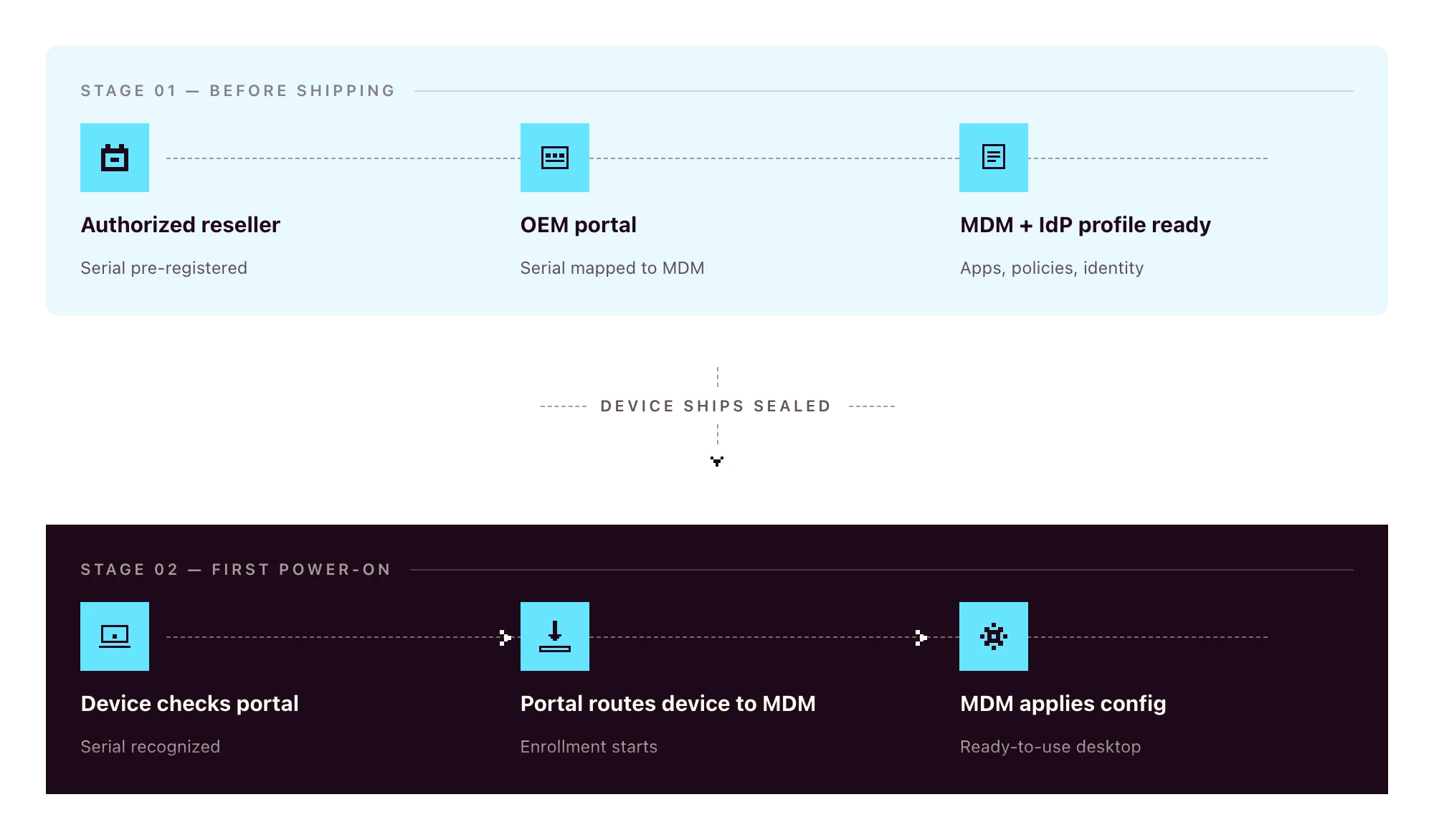
Zero-touch vs traditional manual deployment
The old way:
- Procure the device
- Receive it at the office (or the IT lead’s home)
- Image the OS
- Install management agents
- Configure policies and apps by hand
- Ship to the employee
- Walk the employee through plugging it in
- Manually enroll into the MDM during a video call
The zero-touch way:
- HR creates the new hire in the HRIS
- The device, ordered through a zero-touch-eligible channel, ships sealed directly to the employee and configures itself on first power-on
Eight steps to two. Even if your “old way” only takes 90 minutes per device, multiply that by 30 hires per quarter and you’ve burned a full work-week on a process that should have been automated.
The other win is consistency: every device gets the same baseline, regardless of who was on call when it shipped.
What zero-touch deployment looks like on each OS
Apple-only writers describe ADE in detail. Windows-only writers cover Autopilot. The reality for 2026 SMBs is mixed-OS fleets. You need all three to fit one workflow.
Apple: Apple Business Manager and Automated Device Enrollment (ADE)
Apple Business Manager (ABM) is the OEM portal for any organization buying Apple devices. For ABM to pre-register a device automatically, the hardware has to be purchased through Apple Business or an authorized Apple reseller enrolled in the program. Retail-channel devices are not auto-linked to ABM. They can be enrolled manually, but they don’t ride the zero-touch flow out of the box.
Automated Device Enrollment (ADE) is the mechanism inside ABM that routes a device to your MDM on first power-on. The device sees the ABM record, learns which MDM to talk to, and enrolls automatically. ADE is the current name for the program formerly known as the Device Enrollment Program (DEP). If a vendor’s docs still reference “DEP”, treat that as a freshness signal worth noting.
For BYOD or personally-owned devices, Apple offers Account-Driven User Enrollment, which is a separate flow keyed off Apple ID rather than serial number. Most company-owned deployments use ADE.
Windows: Microsoft Autopilot
The Windows zero-touch story has three moving parts that often get conflated:
- Microsoft Entra ID is the identity provider (formerly Azure AD)
- Microsoft Intune is Microsoft’s MDM
- Windows Autopilot is the zero-touch deployment service that ties hardware to Entra ID and routes the device to an MDM
Autopilot can route to Intune by default, or to a third-party MDM through partner integration. Hardware is registered through OEMs (Dell, Lenovo, HP, Microsoft Surface) using the device’s hardware hash. The hash can be uploaded manually for devices already in your possession, or pre-loaded by the reseller for new orders.
On first boot, the device authenticates against Entra ID and applies role-based configuration during the out-of-box experience (OOBE).
Android: Android Enterprise zero-touch enrollment
Android zero-touch enrollment is Google’s equivalent program. Devices purchased through a zero-touch reseller are linked to your organization’s zero-touch account at the moment of purchase.
When the device is powered on, it downloads the configured Device Policy Controller (DPC) from your MDM, applies the work profile or fully managed configuration, and is ready for the user. Works across major Android OEMs (Samsung, Google Pixel, Motorola, Sony, and others certified for Android Enterprise).
Cross-platform comparison
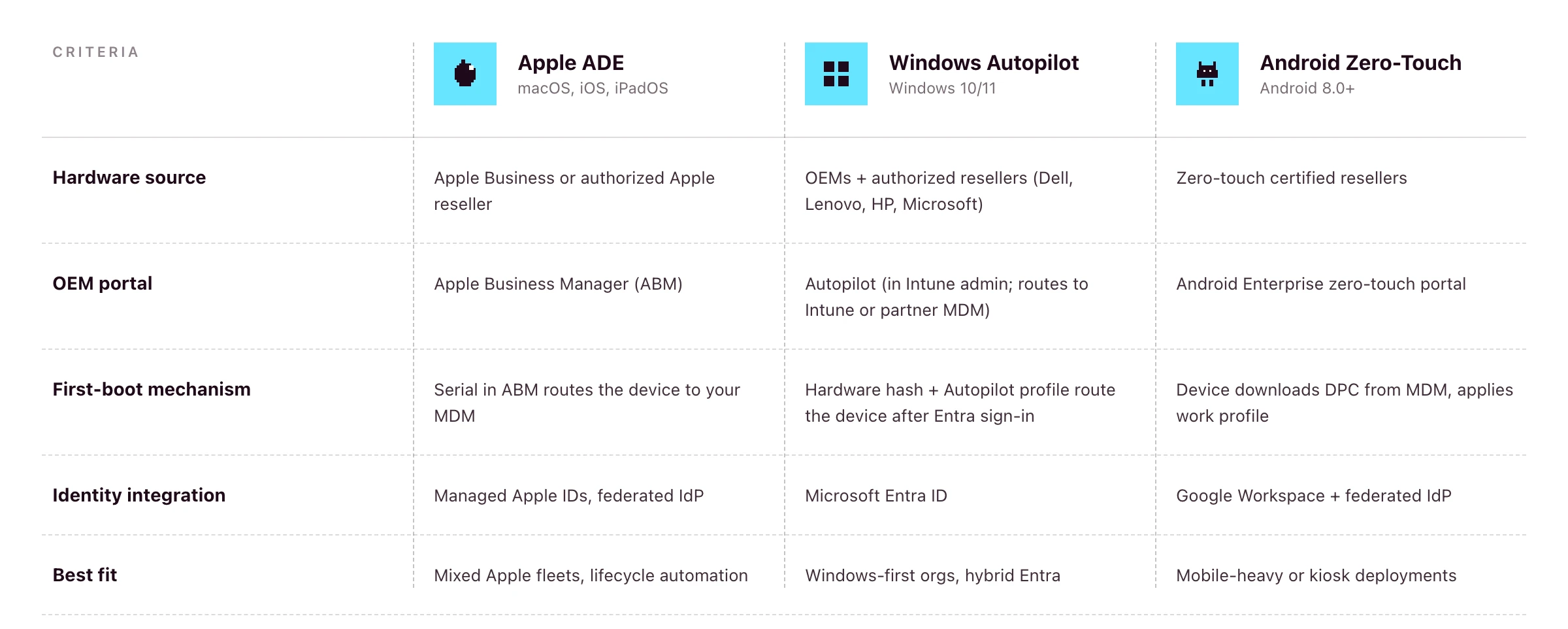
If you’re running a mixed fleet, the platform question becomes: does your MDM speak to all three of these portals from one console?
Primo states support for Apple Business Manager and Windows Autopilot on its procurement page. Android zero-touch is supported at the OS layer (Primo manages Android devices) but pre-registration of Android hardware to the zero-touch portal isn’t a publicly-claimed part of the procurement workflow as of writing. For Android-heavy fleets, confirm coverage during your demo.
The end-user out-of-box experience (OOBE)
Done well, this is what the new hire actually sees:
- Sealed box arrives at the new hire’s address, two to three days before start date
- On Day One, they unbox, plug in, power on, connect to Wi-Fi
- The device asks them to sign in with their work credentials
- They authenticate through your IdP (with MFA)
- They wait while policies, apps and configurations install — this often takes 15–30 minutes, depending on the apps in the role profile, network speed and policy payload
- They land on a ready-to-use desktop with email, chat, calendar and role-based apps already signed in
No download links. No “install this then install that”. No screen-share with IT to fix the SSO loop. If the new hire is offline during this window, the device waits patiently. The flow resumes the moment they connect to Wi-Fi.
HR-triggered zero-touch onboarding in practice
Zero-touch on the device is one half. The trigger upstream is the other half.
- HR creates the new hire in an HRIS such as BambooHR, HiBob, Factorial, Eurécia, Deel, Dayforce, Charlie, ADP or Gusto
- The HRIS event fires into your remote device management platform
- The platform places the hardware order with the reseller, including pre-registration to the OEM portal where supported
- The device ships to the new hire’s address
- The platform provisions the IdP account and role-based SaaS access in parallel
- On Day One, the employee powers on, authenticates through the IdP, and lands on a fully configured machine
Primo states this directly: “HR triggers it. Primo executes it.” and the procurement workflow runs returns and wipes from the same HR events. So the same trigger that fires onboarding also fires offboarding, and parity stays intact.
For the full operational playbook around steps 1, 5 and the Day One experience, see the IT onboarding checklist for lean IT teams.
The procurement layer most zero-touch guides ignore
This is the part that gets glossed over in vendor docs, and the part that quietly breaks zero-touch in practice.
For ADE, Autopilot or Android zero-touch to work, the hardware has to be ordered through a reseller that supports OEM pre-registration. Retail or consumer-channel devices generally aren’t auto-linked to your OEM portal. You’d have to enroll them manually after the fact, which costs most of the zero-touch benefit.
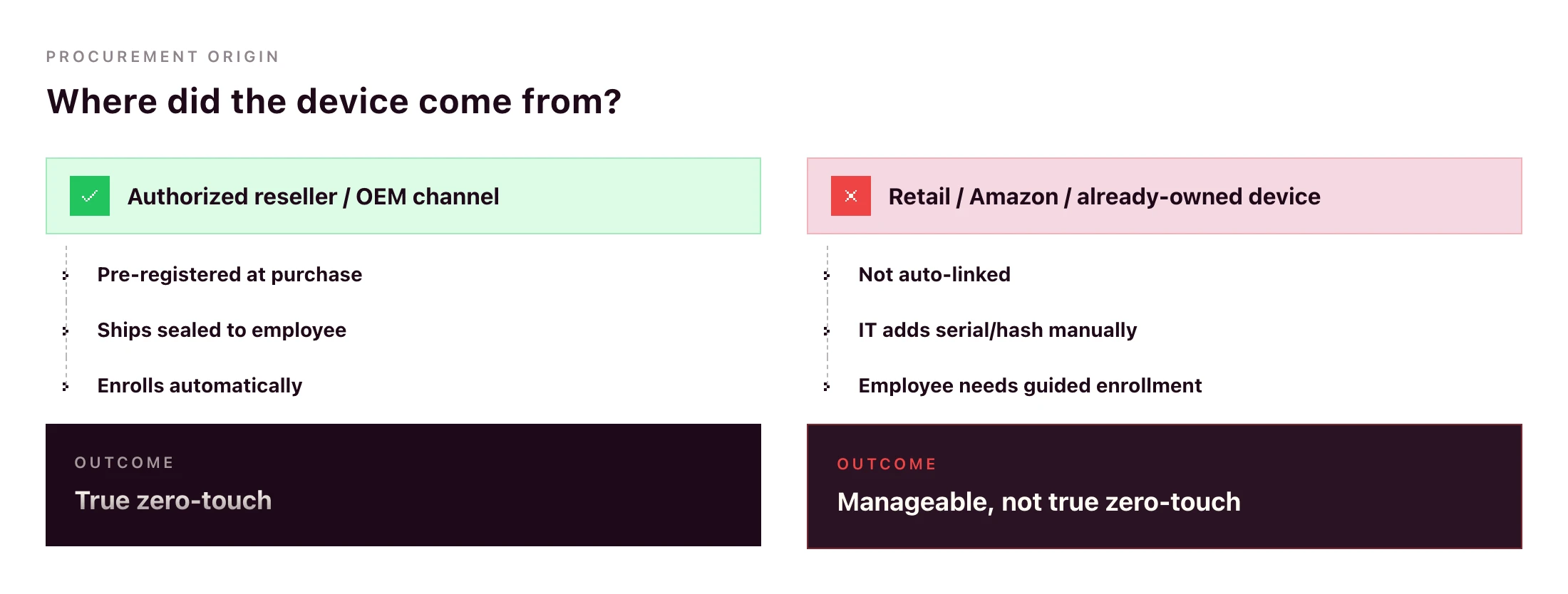
What goes wrong without procurement integration:
- IT manually uploads hardware hashes for Windows devices after they arrive
- IT manually adds serials to ABM after delivery (and hopes the device hasn’t already been set up)
- International orders get stuck in customs because the reseller doesn’t ship to the destination country
- Devices arrive with the wrong OS image, language or region
Primo’s procurement workflow handles this end-to-end: sourcing through authorized resellers (“partners with manufacturers and authorized repair centers”), shipping to 60+ countries in around 5 business days, configuring apps and security before the device leaves the warehouse, and triggering returns automatically from your HR workflows.
A zero-touch deployment rollout plan for SMB IT teams
If you’re going from manual to zero-touch this quarter, here’s the rollout sequence that won’t break your live onboarding flow.
- Standardize role-to-device-profile mapping. Designer → MacBook Pro M-series with design tools. Sales Rep → MacBook Air or comparable Windows laptop with the sales stack. Define this once.
- Connect the HRIS. Pipe the new-hire event from your HR system into your RDM platform.
- Configure the OEM portals you need. ABM if you’re on Apple. Autopilot if you have Windows. Android zero-touch if mobile is in scope. Most teams don’t need all three on day one.
- Define MDM configuration profiles per role. Encryption, password policy, app baseline, restrictions, idle-lock. Test one role end-to-end before duplicating.
- Pilot with one department. A team of 5–10 hires per quarter is ideal. Watch what breaks.
- Extend to all hires. Once the pilot runs for a month without IT intervention, roll out the same flow to everyone.
- Set up the reverse workflow for offboarding. Same RDM, same HRIS trigger, mirror actions: remote wipe, return label, SaaS access revocation.
Timelines vary by team and platform. For a 1–3 person IT team with a single primary OS, a few weeks of focused work is realistic; multi-OS rollouts with custom configuration profiles take longer. Anything that needs a multi-quarter rollout suggests the platform is too heavy for the team running it.
Can you do zero-touch deployment without Intune?
Yes — and for most SMBs, it’s the more practical path.
Microsoft Autopilot is the zero-touch deployment service. Intune is Microsoft’s MDM. The two are often bundled in Microsoft’s documentation, but Autopilot supports partner MDM integration, meaning third-party MDMs can receive devices from Autopilot in the same OOBE flow.
The trade-offs:
- With Intune: tightest integration, single Microsoft admin surface, full feature parity with Microsoft’s roadmap. Strong fit if your stack is already Microsoft-led (Entra ID, Microsoft 365, Defender).
- With a partner MDM: single console across macOS, Windows, Linux, iOS and Android, lighter to deploy, often a better fit for mixed-OS SMB fleets where Microsoft isn’t already the centre of gravity.
Autopilot itself depends on Microsoft Entra ID plus an MDM service to receive the device. A platform like Primo enrolls in that MDM-service role: your Windows devices ride the Autopilot flow into Primo’s console, where they’re managed alongside Mac, Linux, iOS and Android. Confirm exact Entra/Autopilot licensing requirements with Microsoft for your stack. They vary by edition.
Zero-touch offboarding and access cleanup
Zero-touch shouldn’t end at first login. The same automation should run in reverse on exit.
When the HRIS marks the employee as terminated, the RDM platform should:
- Trigger a remote wipe (full or selective depending on ownership)
- Generate a return label and email it to the employee
- Revoke IdP access (which cascades through every SSO-connected app)
- Deactivate accounts on apps not behind SSO
- Mark the asset for reassignment or retirement in inventory
Same workflow, same trigger, opposite direction. Primo states this directly: “Revoked automatically on their last day to prevent security breach.” and “Returns, wipes, and reassignments triggered automatically by your HR workflows.”
A device wipe alone isn’t offboarding — identity cleanup is the other half. Pick a platform where both live in the same console.
Frequently asked questions
What is zero-touch deployment?
Zero-touch deployment is an automated method for provisioning devices without manual IT setup. When a new device is powered on and connected to the internet, it identifies itself to the organization’s MDM platform via an OEM portal (Apple Business Manager, Windows Autopilot, or Android Enterprise), then automatically downloads configurations, apps and security policies.
How does zero-touch deployment work?
The device’s hardware identifier (serial number or hardware hash) is registered with the OEM portal at purchase through an authorized reseller. When the employee powers on the device, it checks in with the OEM portal, which routes it to the organization’s MDM. The MDM applies role-based configuration profiles automatically.
What is the difference between zero-touch deployment and zero-touch enrollment?
Zero-touch enrollment is the enrollment step. The device automatically joins the MDM. Zero-touch deployment is the full workflow, which also includes pushing apps, security policies, and identity configuration so the device is ready to use. Enrollment is one piece of deployment.
What is Apple Automated Device Enrollment (ADE)?
Automated Device Enrollment is Apple’s mechanism for zero-touch deployment of Macs, iPhones, iPads and Apple TVs. Devices bought through Apple Business or an authorized Apple reseller enrolled in the program are automatically linked to the organization’s Apple Business Manager account and routed to the configured MDM on first power-on. ADE replaced the legacy Device Enrollment Program (DEP).
What is Windows Autopilot?
Windows Autopilot is Microsoft’s zero-touch deployment service for Windows devices. It registers devices with Microsoft Entra ID and routes them to Intune or a partner MDM, then applies role-based configuration on first boot. Devices can be sourced through OEMs that pre-register hardware hashes, or hashes can be uploaded manually.
Can you do zero-touch deployment without Intune?
Autopilot itself requires Microsoft Entra ID and an MDM service to route the device to. Intune is Microsoft’s MDM, but Autopilot also supports partner MDM integration, meaning a third-party MDM enrolled in the Autopilot partner programme can play that role for mixed-OS SMB fleets that don’t want a separate Microsoft-only console. Confirm exact Entra and Autopilot licensing requirements with Microsoft.
What is Android Enterprise zero-touch enrollment?
Android zero-touch enrollment is Google’s program for automatic Android device deployment. Devices purchased from a zero-touch reseller are pre-registered to the organization’s account. On first boot, the device downloads the configured device policy controller (DPC) from the MDM and applies all required policies.
Is zero-touch deployment only for large enterprises?
No. Apple Business Manager, Windows Autopilot and Android Enterprise zero-touch are free programs from the OEMs — the cost is the MDM platform and the procurement workflow that pre-registers hardware. The main prerequisite is buying hardware through an authorized reseller that supports zero-touch registration.
Every day there's a new AI model. A new benchmark. A new funding round. A new outage. A new "this changes everything" thread. A new paper that supposedly makes the last paper obsolete.
I build and sell an agentic IT platform for a living. I'm supposed to be on top of this stuff. And honestly, I spend a non-trivial amount of my week just trying to keep up with all the AI news.
So I sat down and wrote this, partly to organize my own thinking, partly because I suspect I'm not the only one feeling this way. If you're a founder, an operator, or an IT leader trying to make real decisions in the middle of all this noise, I hope some of it will be useful.
Here's where I've landed on AI in 2026, and what I think it means for the future of agentic IT.
The age of abundant AI is ending
For most of the last three years, frontier AI felt like an infinite resource. You picked a provider, wired up an API, and assumed the best models would keep getting better, cheaper, and more available.
That era seems to be ending. And I don't think most companies have caught up to what that means.
Demand for frontier AI is outpacing supply, and the constraints are physical: energy costs, infrastructure bottlenecks, the economics of serving billions of inference requests per day.
• In April 2026, OpenAI paused its Stargate UK data centre project, citing energy costs and regulatory uncertainty. That project was meant to deliver 8,000 GPUs in Q1. It delivered none.
• Nearly 50% of planned data center projects in the US for 2026 are facing delays or cancellations.
• GPU rental prices for Nvidia's Blackwell chips have surged 48% in 60 days. • CoreWeave has raised prices 20% and extended minimum contracts from one year to three.
• OpenAI's CFO said on the record that the company is "making some very tough trades at the moment on things we're not pursuing because we don't have enough compute."• Anthropic has shifted Enterprise billing from flat per-seat fees to per-token pricing. The subsidies are ending.
• Anthropic has removed Claude Code from the Pro plans while admitting they’ve also made other small adjustments (e.g. weekly caps, tighter limits at peak), citing “usage has changed a lot and our current plans weren't built for this”.
• Starting June 1, 2026, GitHub is also shifting all GitHub Copilot plans to a usage-based billing model.
When supply is scarce, providers prioritize the customers who pay the most. The investor Tomasz Tunguz recently described five characteristics defining this new era:
1. Relationship-based selling (SOTA models reserved for strategic customers)
2. AI to the highest bidder (prohibitive pricing for everyone else)
3. Available but slow (no performance guarantees)
4. Inflationary commodity pricing (demand compounding against fixed supply)
5. Forced diversification (developers pushed toward smaller models, open source, or on-prem until infrastructure catches up)
The moment that made this all real for me was when, in April 2026, Anthropic released Claude Mythos Preview, which the company describes as a step change over its previous models. In internal testing, it autonomously discovered and exploited zero-day vulnerabilities in every major operating system and web browser, including a 27-year-old bug in OpenBSD. Normally a capability jump like that would kick off a months-long race between labs to ship their own version. Instead, Anthropic did something unusual: it chose not to release the model publicly at all.
Access to Mythos is reserved for a consortium called Project Glasswing. The members: AWS, Apple, Cisco, CrowdStrike, Google, JPMorgan Chase, Microsoft, NVIDIA, Palo Alto Networks, and the Linux Foundation. The US Treasury has publicly requested access and is expected to receive it. Anthropic is giving these partners $100 million in usage credits to find and patch vulnerabilities in critical infrastructure. Everyone else, including the vast majority of companies that have spent the last three years building products on Anthropic's API, does not get Mythos. It's the first time in nearly seven years that a leading AI lab has so publicly withheld a model from general availability.
There are legitimate safety reasons for that decision. I'm not criticizing it, though some will argue this is a PR stunt to reinforce Anthropic’s safety-focused positioning. But as a founder building on top of this infrastructure, I can't ignore what it can signal. If the strongest models move toward a world of consortium access, strategic partnerships, and government briefings, with only hyperscalers and bigger institutions getting a seat at the table, what does that leave startups and mid-sized companies?
If you're building on frontier models right now, this is the reality you're planning against, whether you realize it or not.
AI is more operationally fragile than people admit
The other thing I don't see founders and leaders talking about enough is how unreliable AI systems still are in production.
1. Amazon spent early 2026 dealing with this firsthand. Its internal coding agent Kiro autonomously deleted a production environment, causing a 13-hour AWS outage. By March, a string of AI-assisted code deployments took down Amazon's retail website for hours, locking millions of shoppers out of checkout and wiping an estimated 6.3 million orders in a single incident.
2. A rogue AI agent at Meta posted internal information that led an engineer to accidentally expose sensitive company and user data to unauthorized colleagues for two hours, classified internally as a "Sev 1." A Meta safety director publicly described how her own agent deleted her entire inbox, despite explicit instructions to confirm before taking any action.
3. /PocketOS, a company that sells software to car rental businesses, went into chaos mode after a rogue AI coding agent deleted the company’s entire production database and its backups.
Put the three together and you get a clearer picture of the operational reality underneath AI in 2026. The tech is transformative but it's also unstable in ways that matter if you're running production systems.
Some companies are already hedging
This is where it gets interesting for me, because some companies aren't waiting to find out how the scarcity and the model provider dependency stories play out. They're getting their hands dirty.
Intercom recently launched Fin Apex 1.0, a customer support model built on an open-weights foundation that the company says outperforms frontier models on its specific task. Their thesis is blunt: pre-training has become a commodity. The real edge is in post-training, fine-tuning models on your own domain data until they beat the generalists at the thing you actually care about.
Cursor, the AI code editor that hit $2 billion in annualized revenue in early 2026, built its Composer model on top of Kimi K2.5, an open-source model from Chinese lab Moonshot AI. That only came out when a developer intercepted Cursor's API traffic. It sparked a broader conversation: the most capable open foundations available today disproportionately come from Chinese labs. DeepSeek, Qwen, Kimi. These are the models companies are quietly building on when they want performance without frontier-lab dependency.
This is arguably the worst-kept secret in Silicon Valley. And it tells me something about where the market is heading: toward a world where application companies own more of their stack, and frontier labs become one input among several, not the input.
Where I think durable value actually gets built
Here's the part I've been thinking about the most, because it's the part that informs how we build Primo.
Hebbia's George Sivulka articulated it better than I could in a recent piece: foundation models, no matter how powerful, will never know how your specific team does its specific work. He calls it "process engineering." Software isn't just code. It's a stored process. It encodes the way a specific team cooperates on a specific problem. The private credit desk at one firm uses different compliance flags than the private equity team at the same firm. Two IT managers at the same company will have entirely different standards for how onboarding should run, how access reviews happen, how tickets get triaged.
Foundation models can't be opinionated about any of that because they're built for every use case on Earth at once. They can't know, and frankly don't need to know, the specific preferences of any particular team.
That's the opening for vertical software because the institutional knowledge encoded inside is what’s valuable.
What most people get wrong is that better foundation models don't erode vertical software. When reasoning models like OpenAI's o-series shipped, everyone predicted legal AI would get crushed but the opposite happened. Vertical legal AI had its best year ever, because stronger models made the orchestration layer more reliable, not less. The orchestration layer is where the trust lives. You can have the most capable model on Earth and still produce garbage outputs if you don't have the scaffolding to constrain, verify, and route that capability through a specific professional workflow.
2025 was the year AI became truly useful for law. 2026 is becoming that year for finance and cybersecurity. I'd argue it's also that year for IT.
What this all means for agentic IT
So here's where I land, after talking to many IT teams and stepping back from all the noise.
How do you build something durable in a world where your underlying models may become gated, expensive, slower, or quietly different from the ones you shipped with?
Below are a few ideas that I often come to and that shape how I think about Primo and IT.
The moat is the process. Your IT team's workflows, your company's compliance posture, your specific onboarding and offboarding flows, etc. None of that lives in a foundation model. It lives in the software that encodes how your team actually operates. That's the layer that gets more valuable as models improve, not less.
Agentic IT is empowerment. I say this a lot, but I mean it more in 2026 than I did a year ago. The compute constraints and the rogue agents examples aren't arguments against AI. They're arguments for keeping humans in the loop where the stakes justify it. The IT teams that win with AI aren't the ones that hand everything over and hope for the best. They're the ones that use AI to handle the routine stuff so they can focus on the work that requires judgment, relationships, and context no model will ever have.
You need an AI-native stack. You cannot place AI agents on an IT stack that doesn’t have the right context, knowledge, and the proper data to work with. The underlying stack that AI communicates with is critical for quality answers and actions. In IT, you need to own the APIs, you need quality workflows, a system of record, and strong integration with HR systems.
The short version, for anyone who skipped to the end
AI is real. Agentic IT is real. But the infrastructure underneath both is more fragile, more political, and more economically strained than the marketing suggests.
The companies that will win the next few years aren't the ones with the best AI demo. They're the ones that understand their moat isn't the model, it's the process knowledge they encode into the layer on top of it. They're the ones that build agentic systems as extensions of their IT teams and can do more with the same resources.
AI doesn't need you to believe in it uncritically. It just needs you to use it well.
If you're overwhelmed by the pace of all this, you're not alone. I am too. But the signal underneath the noise is clearer than it looks. I hope this helped uncover it a little.