Zero-Touch Deployment: Apple ADE, Autopilot & Android
Zero-touch deployment (ZTD) is automated device provisioning that requires no manual IT setup once the device is powered on. Hardware is registered to an OEM portal at purchase. On first power-on, the device checks in with that portal, gets routed to your MDM, and downloads the configuration profiles, apps and security policies tied to that user’s role.
Three prerequisites, the same on every OS:
- An authorized reseller that can pre-register the device to the relevant OEM portal
- The OEM portal itself: Apple Business Manager, Microsoft Autopilot, or Android Enterprise zero-touch
- An MDM/UEM platform wired into the portal
The OEM programs are free from Apple, Microsoft and Google. The MDM, procurement integration and rollout work are not. This article covers how the three OS programs work, what the out-of-box experience looks like, and how to roll zero-touch out on a 1–3 person IT team.
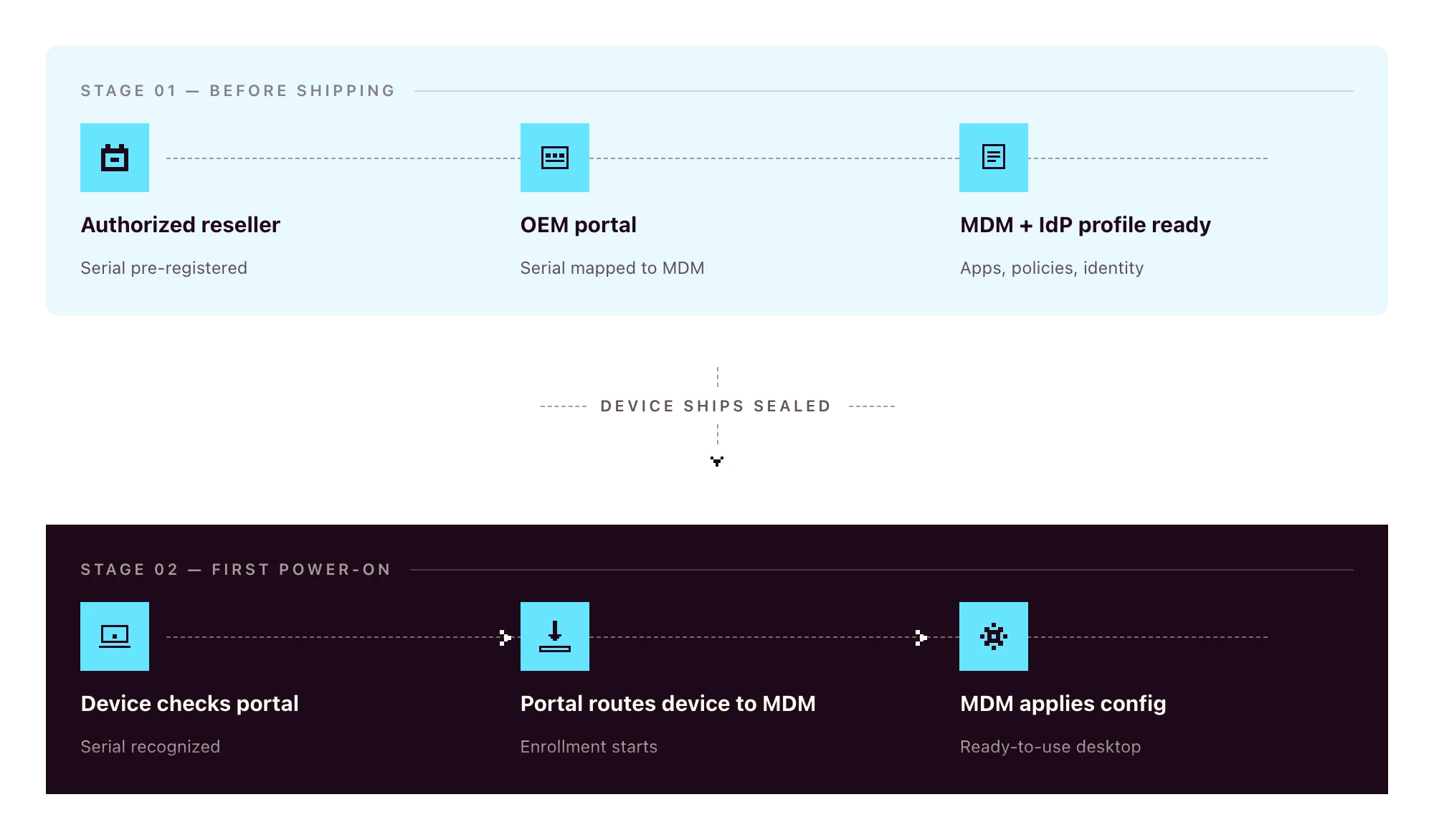
Zero-touch vs traditional manual deployment
The old way:
- Procure the device
- Receive it at the office (or the IT lead’s home)
- Image the OS
- Install management agents
- Configure policies and apps by hand
- Ship to the employee
- Walk the employee through plugging it in
- Manually enroll into the MDM during a video call
The zero-touch way:
- HR creates the new hire in the HRIS
- The device, ordered through a zero-touch-eligible channel, ships sealed directly to the employee and configures itself on first power-on
Eight steps to two. Even if your “old way” only takes 90 minutes per device, multiply that by 30 hires per quarter and you’ve burned a full work-week on a process that should have been automated.
The other win is consistency: every device gets the same baseline, regardless of who was on call when it shipped.
What zero-touch deployment looks like on each OS
Apple-only writers describe ADE in detail. Windows-only writers cover Autopilot. The reality for 2026 SMBs is mixed-OS fleets. You need all three to fit one workflow.
Apple: Apple Business Manager and Automated Device Enrollment (ADE)
Apple Business Manager (ABM) is the OEM portal for any organization buying Apple devices. For ABM to pre-register a device automatically, the hardware has to be purchased through Apple Business or an authorized Apple reseller enrolled in the program. Retail-channel devices are not auto-linked to ABM. They can be enrolled manually, but they don’t ride the zero-touch flow out of the box.
Automated Device Enrollment (ADE) is the mechanism inside ABM that routes a device to your MDM on first power-on. The device sees the ABM record, learns which MDM to talk to, and enrolls automatically. ADE is the current name for the program formerly known as the Device Enrollment Program (DEP). If a vendor’s docs still reference “DEP”, treat that as a freshness signal worth noting.
For BYOD or personally-owned devices, Apple offers Account-Driven User Enrollment, which is a separate flow keyed off Apple ID rather than serial number. Most company-owned deployments use ADE.
Windows: Microsoft Autopilot
The Windows zero-touch story has three moving parts that often get conflated:
- Microsoft Entra ID is the identity provider (formerly Azure AD)
- Microsoft Intune is Microsoft’s MDM
- Windows Autopilot is the zero-touch deployment service that ties hardware to Entra ID and routes the device to an MDM
Autopilot can route to Intune by default, or to a third-party MDM through partner integration. Hardware is registered through OEMs (Dell, Lenovo, HP, Microsoft Surface) using the device’s hardware hash. The hash can be uploaded manually for devices already in your possession, or pre-loaded by the reseller for new orders.
On first boot, the device authenticates against Entra ID and applies role-based configuration during the out-of-box experience (OOBE).
Android: Android Enterprise zero-touch enrollment
Android zero-touch enrollment is Google’s equivalent program. Devices purchased through a zero-touch reseller are linked to your organization’s zero-touch account at the moment of purchase.
When the device is powered on, it downloads the configured Device Policy Controller (DPC) from your MDM, applies the work profile or fully managed configuration, and is ready for the user. Works across major Android OEMs (Samsung, Google Pixel, Motorola, Sony, and others certified for Android Enterprise).
Cross-platform comparison
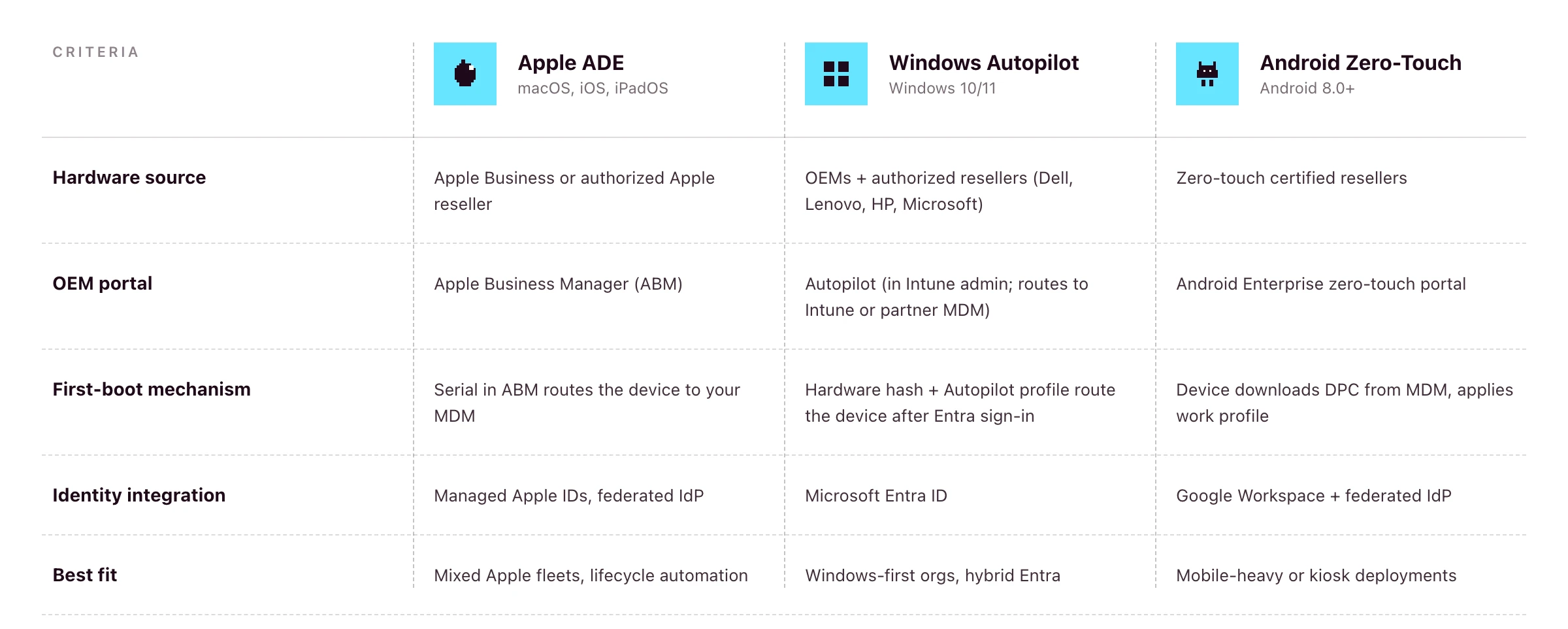
If you’re running a mixed fleet, the platform question becomes: does your MDM speak to all three of these portals from one console?
Primo states support for Apple Business Manager and Windows Autopilot on its procurement page. Android zero-touch is supported at the OS layer (Primo manages Android devices) but pre-registration of Android hardware to the zero-touch portal isn’t a publicly-claimed part of the procurement workflow as of writing. For Android-heavy fleets, confirm coverage during your demo.
The end-user out-of-box experience (OOBE)
Done well, this is what the new hire actually sees:
- Sealed box arrives at the new hire’s address, two to three days before start date
- On Day One, they unbox, plug in, power on, connect to Wi-Fi
- The device asks them to sign in with their work credentials
- They authenticate through your IdP (with MFA)
- They wait while policies, apps and configurations install — this often takes 15–30 minutes, depending on the apps in the role profile, network speed and policy payload
- They land on a ready-to-use desktop with email, chat, calendar and role-based apps already signed in
No download links. No “install this then install that”. No screen-share with IT to fix the SSO loop. If the new hire is offline during this window, the device waits patiently. The flow resumes the moment they connect to Wi-Fi.
HR-triggered zero-touch onboarding in practice
Zero-touch on the device is one half. The trigger upstream is the other half.
- HR creates the new hire in an HRIS such as BambooHR, HiBob, Factorial, Eurécia, Deel, Dayforce, Charlie, ADP or Gusto
- The HRIS event fires into your remote device management platform
- The platform places the hardware order with the reseller, including pre-registration to the OEM portal where supported
- The device ships to the new hire’s address
- The platform provisions the IdP account and role-based SaaS access in parallel
- On Day One, the employee powers on, authenticates through the IdP, and lands on a fully configured machine
Primo states this directly: “HR triggers it. Primo executes it.” and the procurement workflow runs returns and wipes from the same HR events. So the same trigger that fires onboarding also fires offboarding, and parity stays intact.
For the full operational playbook around steps 1, 5 and the Day One experience, see the IT onboarding checklist for lean IT teams.
The procurement layer most zero-touch guides ignore
This is the part that gets glossed over in vendor docs, and the part that quietly breaks zero-touch in practice.
For ADE, Autopilot or Android zero-touch to work, the hardware has to be ordered through a reseller that supports OEM pre-registration. Retail or consumer-channel devices generally aren’t auto-linked to your OEM portal. You’d have to enroll them manually after the fact, which costs most of the zero-touch benefit.
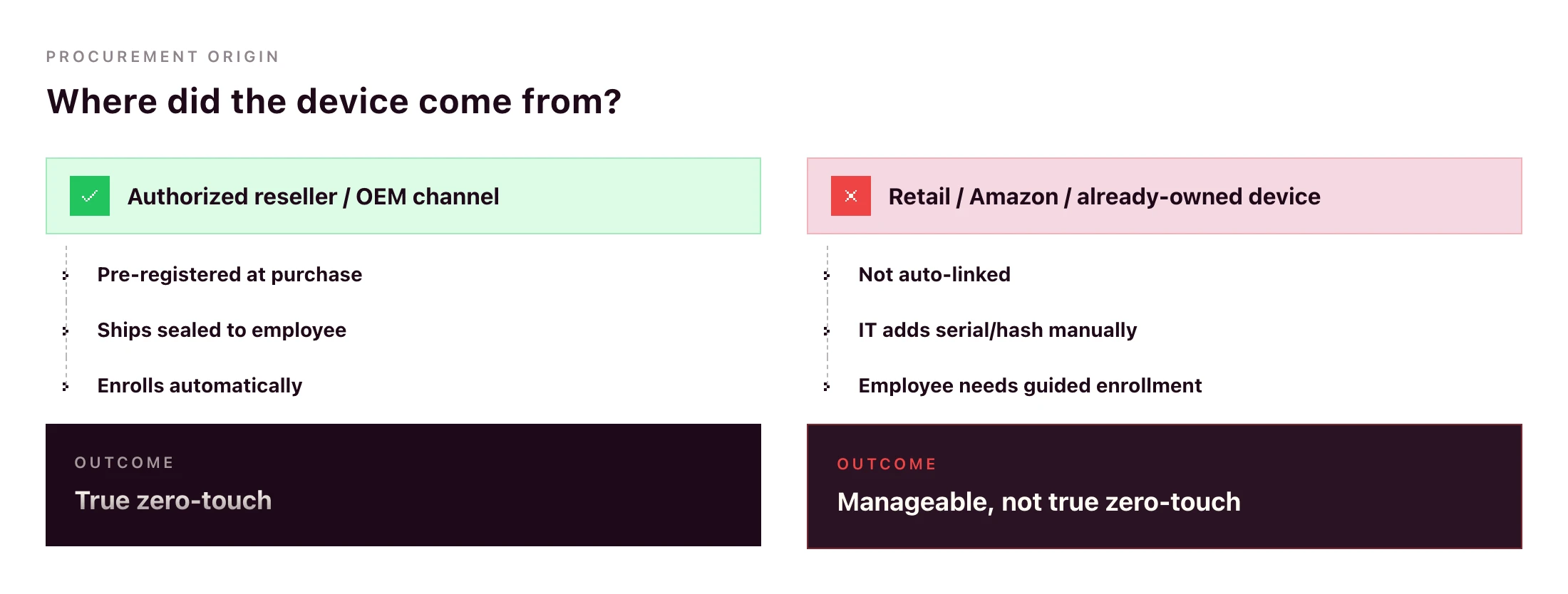
What goes wrong without procurement integration:
- IT manually uploads hardware hashes for Windows devices after they arrive
- IT manually adds serials to ABM after delivery (and hopes the device hasn’t already been set up)
- International orders get stuck in customs because the reseller doesn’t ship to the destination country
- Devices arrive with the wrong OS image, language or region
Primo’s procurement workflow handles this end-to-end: sourcing through authorized resellers (“partners with manufacturers and authorized repair centers”), shipping to 60+ countries in around 5 business days, configuring apps and security before the device leaves the warehouse, and triggering returns automatically from your HR workflows.
A zero-touch deployment rollout plan for SMB IT teams
If you’re going from manual to zero-touch this quarter, here’s the rollout sequence that won’t break your live onboarding flow.
- Standardize role-to-device-profile mapping. Designer → MacBook Pro M-series with design tools. Sales Rep → MacBook Air or comparable Windows laptop with the sales stack. Define this once.
- Connect the HRIS. Pipe the new-hire event from your HR system into your RDM platform.
- Configure the OEM portals you need. ABM if you’re on Apple. Autopilot if you have Windows. Android zero-touch if mobile is in scope. Most teams don’t need all three on day one.
- Define MDM configuration profiles per role. Encryption, password policy, app baseline, restrictions, idle-lock. Test one role end-to-end before duplicating.
- Pilot with one department. A team of 5–10 hires per quarter is ideal. Watch what breaks.
- Extend to all hires. Once the pilot runs for a month without IT intervention, roll out the same flow to everyone.
- Set up the reverse workflow for offboarding. Same RDM, same HRIS trigger, mirror actions: remote wipe, return label, SaaS access revocation.
Timelines vary by team and platform. For a 1–3 person IT team with a single primary OS, a few weeks of focused work is realistic; multi-OS rollouts with custom configuration profiles take longer. Anything that needs a multi-quarter rollout suggests the platform is too heavy for the team running it.
Can you do zero-touch deployment without Intune?
Yes — and for most SMBs, it’s the more practical path.
Microsoft Autopilot is the zero-touch deployment service. Intune is Microsoft’s MDM. The two are often bundled in Microsoft’s documentation, but Autopilot supports partner MDM integration, meaning third-party MDMs can receive devices from Autopilot in the same OOBE flow.
The trade-offs:
- With Intune: tightest integration, single Microsoft admin surface, full feature parity with Microsoft’s roadmap. Strong fit if your stack is already Microsoft-led (Entra ID, Microsoft 365, Defender).
- With a partner MDM: single console across macOS, Windows, Linux, iOS and Android, lighter to deploy, often a better fit for mixed-OS SMB fleets where Microsoft isn’t already the centre of gravity.
Autopilot itself depends on Microsoft Entra ID plus an MDM service to receive the device. A platform like Primo enrolls in that MDM-service role: your Windows devices ride the Autopilot flow into Primo’s console, where they’re managed alongside Mac, Linux, iOS and Android. Confirm exact Entra/Autopilot licensing requirements with Microsoft for your stack. They vary by edition.
Zero-touch offboarding and access cleanup
Zero-touch shouldn’t end at first login. The same automation should run in reverse on exit.
When the HRIS marks the employee as terminated, the RDM platform should:
- Trigger a remote wipe (full or selective depending on ownership)
- Generate a return label and email it to the employee
- Revoke IdP access (which cascades through every SSO-connected app)
- Deactivate accounts on apps not behind SSO
- Mark the asset for reassignment or retirement in inventory
Same workflow, same trigger, opposite direction. Primo states this directly: “Revoked automatically on their last day to prevent security breach.” and “Returns, wipes, and reassignments triggered automatically by your HR workflows.”
A device wipe alone isn’t offboarding — identity cleanup is the other half. Pick a platform where both live in the same console.
Frequently asked questions
What is zero-touch deployment?
Zero-touch deployment is an automated method for provisioning devices without manual IT setup. When a new device is powered on and connected to the internet, it identifies itself to the organization’s MDM platform via an OEM portal (Apple Business Manager, Windows Autopilot, or Android Enterprise), then automatically downloads configurations, apps and security policies.
How does zero-touch deployment work?
The device’s hardware identifier (serial number or hardware hash) is registered with the OEM portal at purchase through an authorized reseller. When the employee powers on the device, it checks in with the OEM portal, which routes it to the organization’s MDM. The MDM applies role-based configuration profiles automatically.
What is the difference between zero-touch deployment and zero-touch enrollment?
Zero-touch enrollment is the enrollment step. The device automatically joins the MDM. Zero-touch deployment is the full workflow, which also includes pushing apps, security policies, and identity configuration so the device is ready to use. Enrollment is one piece of deployment.
What is Apple Automated Device Enrollment (ADE)?
Automated Device Enrollment is Apple’s mechanism for zero-touch deployment of Macs, iPhones, iPads and Apple TVs. Devices bought through Apple Business or an authorized Apple reseller enrolled in the program are automatically linked to the organization’s Apple Business Manager account and routed to the configured MDM on first power-on. ADE replaced the legacy Device Enrollment Program (DEP).
What is Windows Autopilot?
Windows Autopilot is Microsoft’s zero-touch deployment service for Windows devices. It registers devices with Microsoft Entra ID and routes them to Intune or a partner MDM, then applies role-based configuration on first boot. Devices can be sourced through OEMs that pre-register hardware hashes, or hashes can be uploaded manually.
Can you do zero-touch deployment without Intune?
Autopilot itself requires Microsoft Entra ID and an MDM service to route the device to. Intune is Microsoft’s MDM, but Autopilot also supports partner MDM integration, meaning a third-party MDM enrolled in the Autopilot partner programme can play that role for mixed-OS SMB fleets that don’t want a separate Microsoft-only console. Confirm exact Entra and Autopilot licensing requirements with Microsoft.
What is Android Enterprise zero-touch enrollment?
Android zero-touch enrollment is Google’s program for automatic Android device deployment. Devices purchased from a zero-touch reseller are pre-registered to the organization’s account. On first boot, the device downloads the configured device policy controller (DPC) from the MDM and applies all required policies.
Is zero-touch deployment only for large enterprises?
No. Apple Business Manager, Windows Autopilot and Android Enterprise zero-touch are free programs from the OEMs — the cost is the MDM platform and the procurement workflow that pre-registers hardware. The main prerequisite is buying hardware through an authorized reseller that supports zero-touch registration.
Recommended articles
Remote device management (RDM) is the practice of monitoring, configuring and securing devices from a central console without physical access. Lean IT teams use it to enroll laptops, phones and tablets across macOS, Windows, Linux, iOS and Android, push software and policies, automate patching, and lock or wipe devices remotely — all without sending an IT lead to a desk.
This is the operating model that makes distributed teams possible. Below: what RDM covers in 2026, how it relates to MDM, RMM and UEM, and how to evaluate a platform when you're running IT for a 50–2,000 employee company.
What remote device management covers
The six core pillars:
• Provisioning: enrolling a device and pushing a baseline configuration
• Telemetry: inventory, health and compliance data collected in the background
• Remote access: viewing or controlling a device, where the OS allows it, with the user's consent
• Patch management: keeping the OS and apps up to date on a defined cadence
• Policy enforcement: encryption, password rules, firewall, conditional access
• Lock and wipe: recovering or destroying data on a lost, stolen or returned device
A serious RDM platform delivers all six in one console, not split across three vendors. That single-console claim is what separates platforms built for the SMB operator from enterprise tools that scale down poorly.
RDM vs MDM vs RMM vs UEM
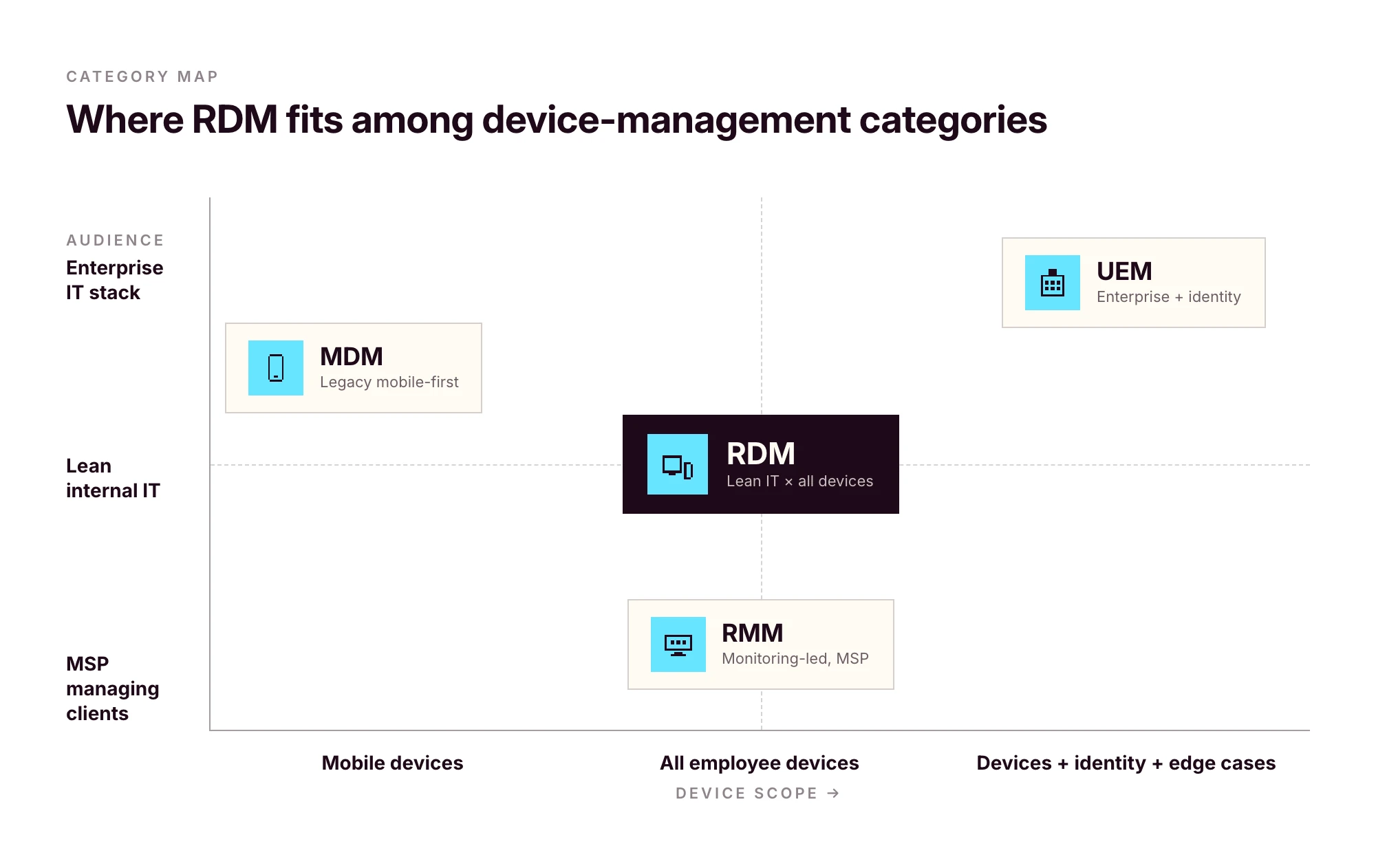
The acronyms have drifted over the last decade. Vendors use them interchangeably; the original definitions still help.
In practice, most modern MDM platforms function as full RDM systems, and UEM has become a marketing label that often means "MDM plus identity." For an SMB, the practical question isn't the label — it's whether the platform covers every OS you run, integrates with your HRIS and identity provider, and handles the full device lifecycle.
If a vendor's "MDM" only covers Apple, it isn't RDM. If a vendor's "UEM" needs a six-month enterprise rollout, it isn't built for you.
What modern remote device management software actually does
A modern RDM platform should give you the following without third-party agents bolted on.
Remote view, with the user's consent
Screen sharing for support. Standard on macOS and Windows. Unattended remote control depends on OS permissions and consent prompts. iOS in particular restricts unattended control by design, and any platform claiming otherwise is overselling.
Remote scripting and terminal
Shell access (SSH on macOS/Linux, PowerShell on Windows) for diagnostics and remediation at scale. On Linux endpoints, this is also how most fleet management gets done in practice, scripts, inventory checks, configuration management, since GUI-driven control is OS-dependent.
Background telemetry
Hardware inventory, installed apps, OS version, encryption status, last seen, last user. Refreshed automatically. The first time a laptop goes missing or an auditor asks for an asset list, this data pays for itself.
Patch management
Automated OS and third-party app updates with deferral windows. A critical security patch can't be silently ignored. A non-critical update can't disrupt someone mid-customer-call.
Policy enforcement
Disk encryption (FileVault on macOS, BitLocker on Windows, LUKS on Linux), password complexity, idle-lock, firewall, USB restrictions. Pushed once, enforced everywhere.
Lock and wipe
Two flavours. Full wipe for company-owned devices being decommissioned. Selective approaches for BYOD: on macOS, Account-Driven User Enrollment cleans only managed data; on Windows, Intune App Protection Policies do similar work for managed apps; on Android, Work Profiles isolate corporate data so it can be removed without touching the personal side. The right pattern depends on ownership and OS — your RDM should support all of them.
Role-based access governance
A point most teams overlook until they hire their second IT admin. Strong RDM platforms enforce role-based access governance in two distinct places: across the SaaS apps the platform provisions, and on the management console itself. Primo states the first explicitly: "Role-Based Access Control (RBAC) across every app", with policies tied to roles instead of individuals. Confirm with any vendor that the same governance applies to who can wipe a device or run a remote script inside the admin console, not just to the apps the platform manages. SSO on the console matters for the same reason: when an admin leaves, their management access should die with their identity record.
Multi-OS coverage: the operating system matrix
This is where most vendors fall short. Apple-only platforms (Jamf, Mosyle) skip Windows and Linux. Windows-led platforms (Intune) treat Macs as second-class. The cost of stitching three tools together (three contracts, three consoles, policies that drift) stays invisible until you're the one keeping them in sync.
Sanity-check what's actually possible per OS before evaluating any platform.
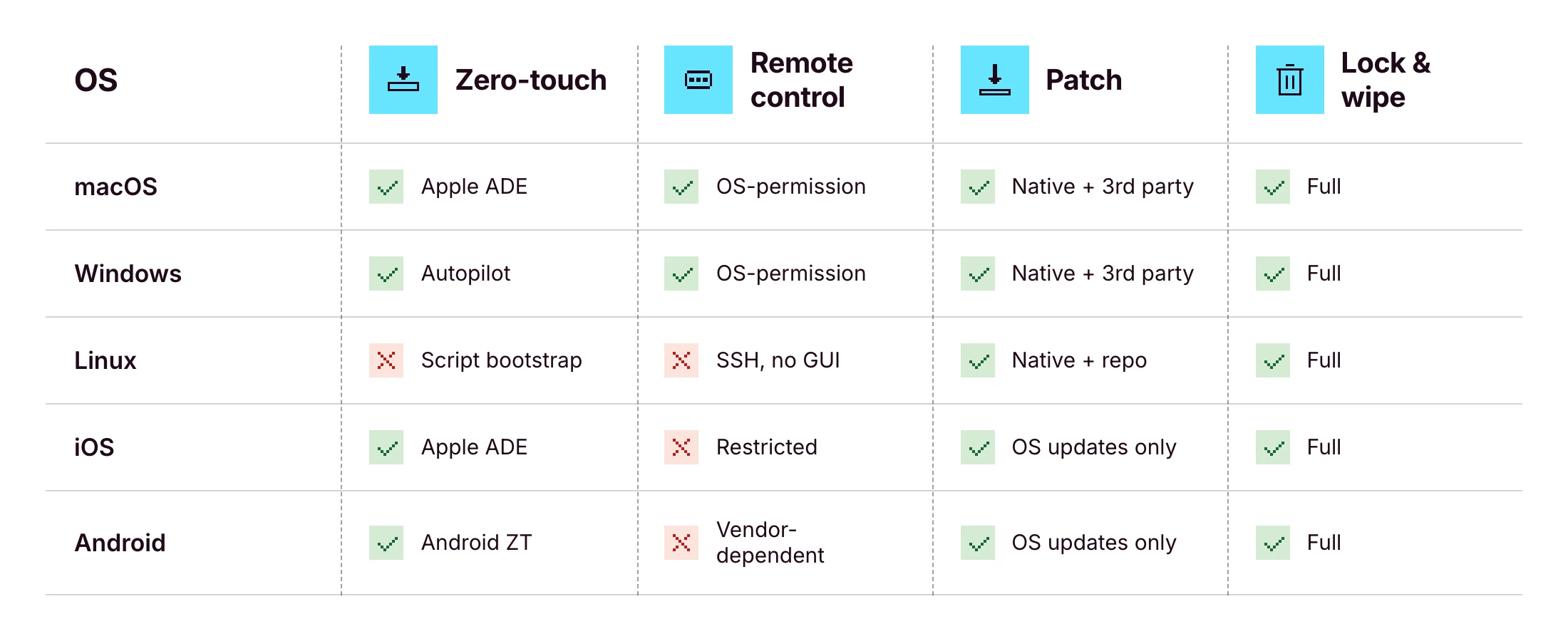
The honest answer: no platform delivers 100% of every cell. iOS unattended remote control is impossible by design. See the Apple Business Manager deployment guide for the underlying constraints, and Microsoft Intune device management docs for the Windows-side equivalents. What you should expect from a serious RDM platform is a unified console for all five operating systems, which Primo states as "Mac, Windows, Linux, iOS, and Android managed from a single interface" — and parity wherever the OS allows it.
The full remote device lifecycle: from procurement to retrieval
Most RDM guides start at enrollment and end at wipe. That's the part of the lifecycle that touches the management console. It's also only half of what IT actually owns.
The full picture:
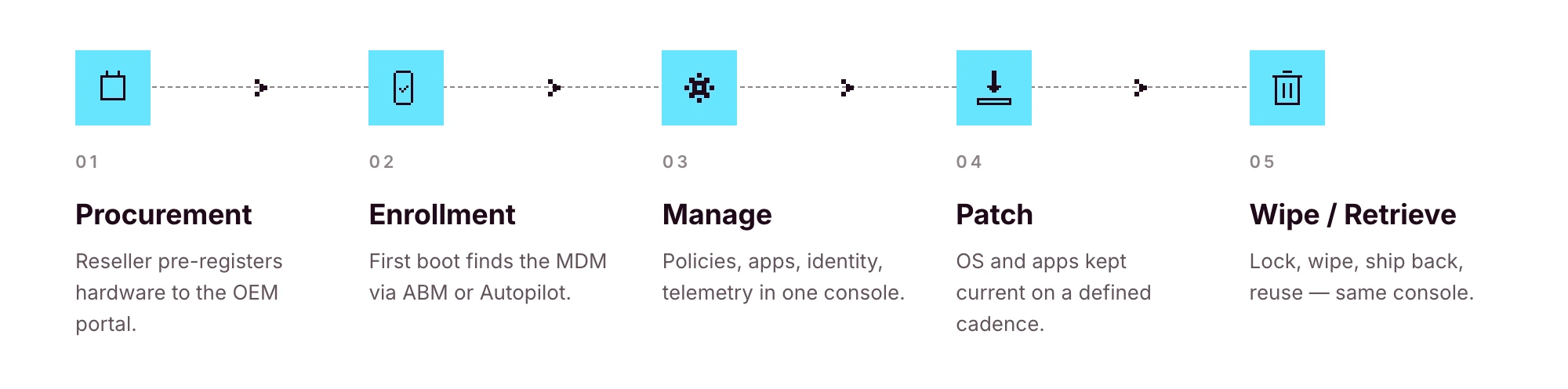
1. Source: purchase from an authorized reseller that can pre-register hardware to the OEM portal
2. Ship: direct-to-employee, ideally with zero IT handling in between
3. Enroll: first power-on, the device finds its MDM through Apple Business Manager or Windows Autopilot
4. Manage: policies, apps, identity, telemetry
5. Patch: OS and app updates on a defined cadence
6. Lock and wipe: on request, on loss, or on exit
7. Retrieve: return label or pickup, ideally triggered automatically
8. Reassign or retire: back into stock for the next hire, or recycled responsibly
If your RDM tool only covers steps 3–6, you're stitching together couriers, OEM portals, reseller order forms and spreadsheets to handle the rest. That stitching is where lean IT teams burn the most time.
Procurement integration is the part most teams don't realize they're missing until they've lived without it. Primo's procurement workflow covers 60+ countries with delivery in around 5 business days, ships devices with apps and security settings pre-configured, and triggers returns and wipes automatically from your HR workflows. That removes steps 1, 2, 7 and 8 from your hands.
Why remote device management breaks at the HR-IT handoff
A new hire is created in your HRIS on Monday. They start three weeks later. Between those two dates, four to seven separate things have to happen on the IT side: order the laptop, create the IdP account, provision the right SaaS apps, assign role-based policies, ship the device, prepare the Day One guide.
If your only trigger is a Slack message from HR, something will slip. Usually not the laptop — laptops are visible. It's the seventh-tier SaaS app the new hire needs in week two, which nobody remembers exists until they ask for access.
Modern RDM treats the HRIS event as the source of truth, then fires the entire downstream workflow:
• HRIS creates the employee record →
• IdP account is provisioned →
• Role-based SaaS access is granted →
• Device is ordered and pre-registered →
• Zero-touch enrollment routes it to the MDM on first power-on →
• Policies and apps deploy automatically
This is the operating model behind Primo's IAM page summary: "HR triggers it. Primo executes it." and "Native integrations with 60+ HRIS, identity providers, and SaaS tools." For lean IT teams, that changes the job description: less ticket execution, more workflow design.
For the practical version of this (phased, role-by-role) read the IT onboarding checklist for lean teams.
A device is offboarded only when access is offboarded too
Wiping the laptop is the easy part.
What about Slack? Google Workspace? HubSpot? Notion? The shared 1Password vault? The GitHub org? The shared admin email for the payments processor?
A device wipe doesn't reclaim SaaS access. The two have to be handled together — and on lean teams, they almost never are. That's the gap that turns into an audit finding six months later: a leaver who still has access to a customer dataset because nobody owned step 4 of the offboarding flow.
Modern RDM platforms treat SaaS access revocation as inseparable from device offboarding. The HRIS exit event that triggers a remote wipe should also revoke IdP access (which cascades through every SSO-connected app), deactivate accounts on apps not behind SSO, reclaim licenses for cost control, and archive shared resources to the right owner. Deprovisioning is a first-class control in NIST SP 800-53 AC-2 (Account Management), not an afterthought.
Primo states this explicitly: "Revoked automatically on their last day to prevent security breach." Identity and device live in the same console, fired from the same HRIS event, on the same schedule — not in two parallel workflows that drift over time.
How to choose a remote device management platform for an SMB
The 10-point checklist that separates platforms built for SMBs from platforms scaled down from the enterprise:
1. Multi-OS coverage: macOS, Windows, Linux, iOS and Android in one console
2. RBAC on the admin console: at least three roles out of the box
3. SSO on the admin console: your IT team's access should die when their identity does
4. HRIS integration: events from systems like BambooHR, HiBob, Factorial, Eurécia, Deel, Dayforce, Charlie, ADP or Gusto trigger downstream workflows
5. Open API and webhooks: anything standard one quarter becomes custom the next
6. Automated patch management: OS and third-party, with deferral windows
7. Procurement integration: sourcing and shipping inside the same operating model
8. Clear vendor jurisdiction and data handling: EU-based vendor for European fleets is a real signal; data-residency claims should be checked in writing
9. Pricing transparency: per-device, monthly, visible without a sales call
10. Time-to-deploy in days, not quarters: if onboarding takes a quarter, it isn't lean-team-fit
Answer "yes" to all ten with the same vendor and you've found your remote device management software. Answer "yes" to nine, and the tenth is the one to negotiate hardest on.
Frequently asked questions
What is remote device management?
Remote device management is the practice of monitoring, configuring, and securing devices from a central console without physical access. IT teams use it to enroll laptops, phones and tablets, push software, enforce security policies, and lock or wipe devices remotely. It applies across macOS, Windows, Linux, iOS and Android.
What is the difference between RDM and MDM?
MDM (mobile device management) historically refers to managing smartphones and tablets. Remote device management is broader and covers any endpoint (laptops, desktops, mobile devices and increasingly IoT) operated remotely. In 2026 the terms overlap, and most modern MDM platforms function as full RDM systems.
How does remote device management work?
A device enrolls into the management platform either manually or through zero-touch deployment. The platform then pushes configuration profiles, apps, and security policies over the air. Admins can remotely view, patch, lock or wipe the device, subject to OS-level permission models. HRIS or IdP integrations can automate enrollment and access changes.
Can one platform manage Mac, Windows, Linux, iPhone and Android?
Yes, but coverage varies by vendor. Apple-only platforms (Jamf, Mosyle) skip Windows and Linux. Cross-platform vendors (Primo, JumpCloud, Intune, Hexnode) support multiple OSes from one console. Verify on the vendor's product page that all five OSes are managed natively, not via third-party agents.
How do you offboard a remote device securely?
Trigger the offboarding workflow from the HRIS. Lock the device, wipe corporate data (full wipe for company-owned, selective approaches for BYOD depending on OS), revoke SaaS and IdP access, send a return label or schedule pickup, then mark the asset for reassignment or retirement in inventory.
What should small businesses look for in remote device management software?
Multi-OS coverage, transparent SMB pricing, HRIS and IdP integrations, RBAC on the admin console, zero-touch deployment support, automated patch management, procurement and shipping integration, clear vendor jurisdiction and data-handling posture, and a time-to-deploy measured in days rather than months.
Is remote device management the same as MDM?
Not exactly. MDM is a subset of remote device management focused historically on mobile. RDM is the broader operational discipline that includes mobile, laptops, desktops, and the workflows around procurement and offboarding. Most modern platforms (UEM, MDM, RDM) functionally overlap.

A new hire’s Day One says everything about how your company runs. If their laptop is on the table, configured, logged in, with the right apps installed — they feel set up. If the laptop is still in a courier’s warehouse and IT is scrambling to provision SSO — they feel like an afterthought, in their first six hours.
This is the IT onboarding checklist lean teams actually use. Five phases, RACI ownership, HRIS-triggered, mirrored for offboarding. Use it as your operating playbook, not a static doc.

The five phases, at a glance
- Pre-boarding (weeks -4 to -1): order the device, create the IdP account, provision baseline SaaS by role, configure the device for delivery.
- Day One: device delivery, SSO login, MFA enrollment, EDR check, Acceptable Use Policy signature.
- Week One: verify every tool works, complete cybersecurity training, schedule first manager check-in.
- First 30 days: audit installed apps against role profile, document additional access requests, validate everything still works.
- Offboarding parity: set up the reverse workflow on Day One, not on exit day.
Each phase has owners, a timeline, and a measurable outcome. Done well, the whole flow runs in the background of an HRIS event. IT only gets pinged on exceptions.
Phase 1: Pre-boarding (weeks -4 to -1)
Most IT onboarding problems are pre-boarding problems. If the laptop is ordered late, Day One can’t be saved. If the IdP account is missing, the SSO chain breaks on first login.
HR-to-IT handoff (intake trigger)
The trigger should be the HRIS event, not a Slack message, not a calendar invite. The minimum payload IT needs to act:
- Full legal name and preferred name
- Start date and timezone
- Role and department
- Manager
- Work location and shipping address
- Hardware preference (if you offer choice)
If you’re capturing this in a Notion form or a Slack thread, you’re one departing teammate away from a gap. Make the HRIS the source of truth and pipe events into your IT workflow tool.
Order the device for direct-to-employee delivery
The window from order to first power-on is the most expensive part of IT onboarding when it goes wrong. Lead times for the EU vary by hardware and reseller; for international hires, add a week for customs.
The right pattern: order through a procurement workflow that ships the device pre-configured directly to the employee. If your platform supports zero-touch deployment, through Apple Business Manager or Windows Autopilot, the device finds your MDM automatically on first power-on, with no IT touch between order and Day One. Primo’s procurement workflow covers 60+ countries with delivery in around 5 business days, with apps and security pre-configured before shipping.
Create the user record in your IdP
Identity is the spine of everything that follows. The IdP account (Microsoft Entra ID, Google Workspace, JumpCloud, your federated IdP of choice) is what every SSO-enabled app will check against. Create it as soon as the HRIS event fires, not on Day One morning.
Provision baseline SaaS access by role
Group memberships in your IdP should map to roles, not individuals. “Designer” gets Figma, Notion, Slack, the design Drive. “Sales Rep” gets HubSpot, Gong, Slack, the sales Drive. Maintain the matrix once; reuse it for every hire.
Phase 2: Day One
A well-run Day One feels boring to IT and magical to the new hire. That’s the goal.
Device delivery and unboxing
If pre-boarding was done right, the new hire receives a sealed box, powers it on, connects to Wi-Fi, and watches the device configure itself. No IT presence required. This is the payoff of zero-touch deployment, and it’s the single most visible signal that your company runs operationally.
First login and SSO verification
The first login should be against your IdP. The new hire enters their company email, completes the IdP flow, and lands on a configured desktop. If they have to type a separate password into anything besides the IdP, your SSO chain has a gap. Fix it before Day One, not after.
MFA enrollment
Enroll the new hire into MFA during the first session. Use a phishing-resistant method (passkey, hardware key, or platform authenticator) wherever your IdP supports it. SMS-based MFA is below the line in 2026. Keep it as a fallback for account recovery only.
EDR agent and security policy check
Endpoint Detection and Response (EDR) should be installed by your MDM as part of the configuration push, not by the user. Verify in the admin console that the agent is reporting healthy before the new hire opens their first customer call. While you’re there, confirm disk encryption (FileVault, BitLocker), firewall, and idle-lock are all green.
Acceptable Use Policy signature
Push the AUP as part of the Day One flow, captured digitally with timestamp. Same for the phishing-awareness module assignment. This is the boring half of compliance, and the half that pays back during your next audit.
Phase 3: Week One and first 30 days
The first week is verification. The next 30 days is calibration.
In Week One, confirm every tool the new hire needs actually works: VPN, conferencing, email signature, calendar permissions, shared drive access, and the second-tier apps that came through the role profile. Schedule the first manager check-in for end-of-week-one, not later. Complete the cybersecurity training module.
In the first 30 days, audit the installed apps against the role profile and document every additional access request that came in. If a single role is generating 10+ ad-hoc access tickets in month one, the role profile is wrong, not the workflow. Fix the profile, not the ticket.
Use your HRIS as the trigger, not a spreadsheet
The single biggest upgrade you can make to IT onboarding isn’t a better checklist. It’s connecting your HRIS so the checklist runs itself.
When a new hire is created in an HRIS like BambooHR, HiBob, Factorial, Eurécia, Deel, Dayforce, Charlie, ADP or Gusto, the right remote device management platform should:
- Create the IdP account
- Order the device through the procurement workflow
- Pre-register the device to the OEM portal where supported
- Assign role-based MDM and SaaS policies
- Send the Day One welcome guide
- Alert IT only if something needs human intervention
This is the model behind Primo’s IAM page summary: “HR triggers it. Primo executes it.” Events flow from HR’s source of truth straight into device, identity and access workflows.
The win isn’t only speed. It’s parity: every new hire gets the same baseline, regardless of whether IT was busy that week.
Provision software and access by role, not app by app
If you’re provisioning SaaS access one app at a time, per hire, you’ve already lost the next ten hours.
The discipline that scales: define role profiles once, then map every new hire to a role. The role determines the apps, the permissions inside those apps, and the IdP groups they belong to.
Apply the Principle of Least Privilege as defined by NIST: each role gets only what’s needed to do the job. Run access reviews quarterly to catch role drift.
A minimal role-profile matrix:
- Designer: Figma, Notion, Slack, Drive. Editor on design assets, viewer elsewhere.
- Sales Rep: HubSpot, Gong, Slack, Drive. CRM rep view + own pipeline.
- Engineer: GitHub, Linear, Slack, Drive, AWS. Repo write on owned projects, AWS dev only.
Role profiles also make offboarding meaningful — you know exactly what to revoke, because you defined it once when you hired the role. Primo surfaces this directly as “Role-Based Access Control (RBAC) across every app”.
Procurement is part of onboarding
This is the part of IT onboarding most checklists skip, and most lean IT teams quietly burn weekend hours on.
A flawless Day One can’t recover from a laptop that arrives late, arrives unconfigured, or arrives at the wrong address. Procurement isn’t a separate vertical. It’s the first stage of onboarding.
For a lean IT team in 2026, procurement should cover:
- Sourcing through authorized resellers (so OEM zero-touch works where supported)
- International shipping with customs handled
- Pre-configuration before the box ships
- Asset tracking from purchase order through delivery
- Return labels generated automatically for the eventual offboarding
If your current setup is “IT lead orders devices manually, ships from home, types serial numbers into a spreadsheet” — that’s the part of the workflow with the highest return on automation. Primo’s procurement workflow handles this end-to-end: “From order to delivery, Primo ships, configures, and tracks every device automatically.”
Build one checklist for onboarding and offboarding
The most expensive part of offboarding isn’t the wipe. It’s the SaaS account nobody owned that quietly retains access for six months.
Every line on your onboarding checklist needs a mirror on your offboarding checklist. Build them at the same time, not on exit day.
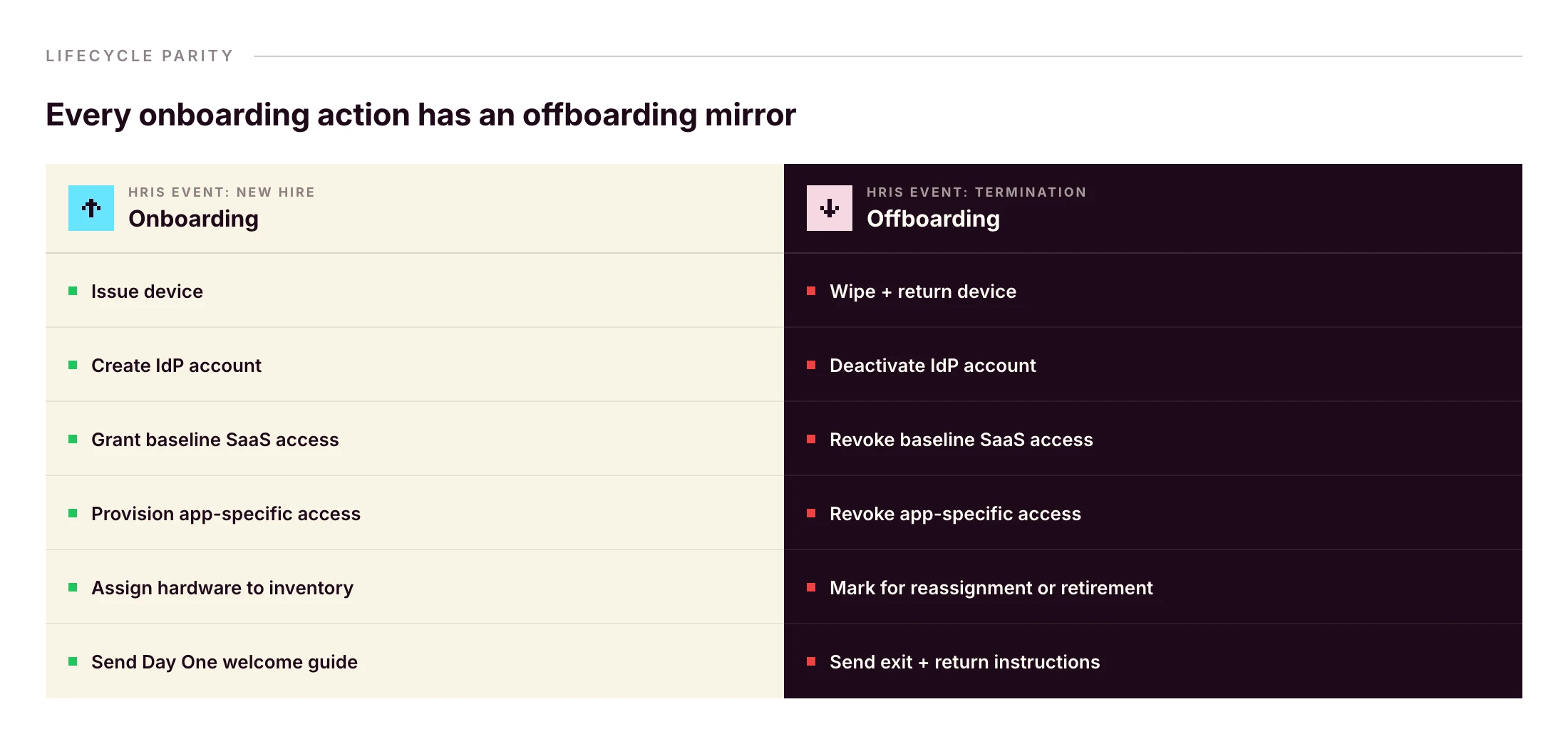
The same HRIS event that started onboarding can fire offboarding. Primo runs this as “Zero forgotten access. Ever. From first day to last, every account, seat, and permission is managed automatically.” and “Revoked automatically on their last day to prevent security breach.”
Without that pattern, a wiped laptop doesn’t reclaim Slack, Google Workspace, HubSpot, or Stripe. Identity and device have to be revoked together — same workflow, same trigger.
Frequently asked questions
What should be on an IT onboarding checklist?
A complete IT onboarding checklist covers pre-boarding (hardware ordering, account creation in the HRIS and IdP, baseline SaaS provisioning), Day One (device delivery, SSO login, MFA setup, EDR install, acceptable use policy signature), and the first 30 days (training, tool verification, access audits). It should also establish offboarding parity from day one.
What is the difference between IT onboarding and HR onboarding?
HR onboarding covers contracts, payroll, benefits, culture and orientation. IT onboarding covers everything the new hire needs to work on Day One: hardware, accounts, applications, security setup and policies. In practice the two should be triggered from the same HRIS event so they stay in sync.
When should IT onboarding start?
IT onboarding should start at least two to four weeks before the new hire’s first day. That window covers hardware ordering and shipping, account creation in the IdP, baseline SaaS provisioning, and any zero-touch deployment configuration. For remote international hires, add another one to two weeks for customs and delivery.
What does a new hire need on Day One?
A configured laptop, working SSO login, MFA enrolled, email and chat access, calendar synced, role-based app access, an installed EDR agent, and a signed acceptable use policy. They also need a working manager check-in and a help channel for IT issues.
How do you onboard a remote employee?
Ship a pre-configured device using zero-touch deployment. Trigger account creation from the HRIS so credentials are ready on Day One. Provide a written Day One guide. Schedule a video onboarding call with IT and the manager. Verify SSO, VPN and MFA remotely. Set up a clear escalation channel for first-week issues.
How long should IT onboarding take?
Pre-boarding spans two to four weeks. Day One setup should take under an hour for the employee if zero-touch deployment is in place. The full onboarding cycle, including training, access audits and role validation, typically runs 30 days. Anything longer suggests manual handoffs in the IT-HR workflow.
Who is responsible for IT onboarding?
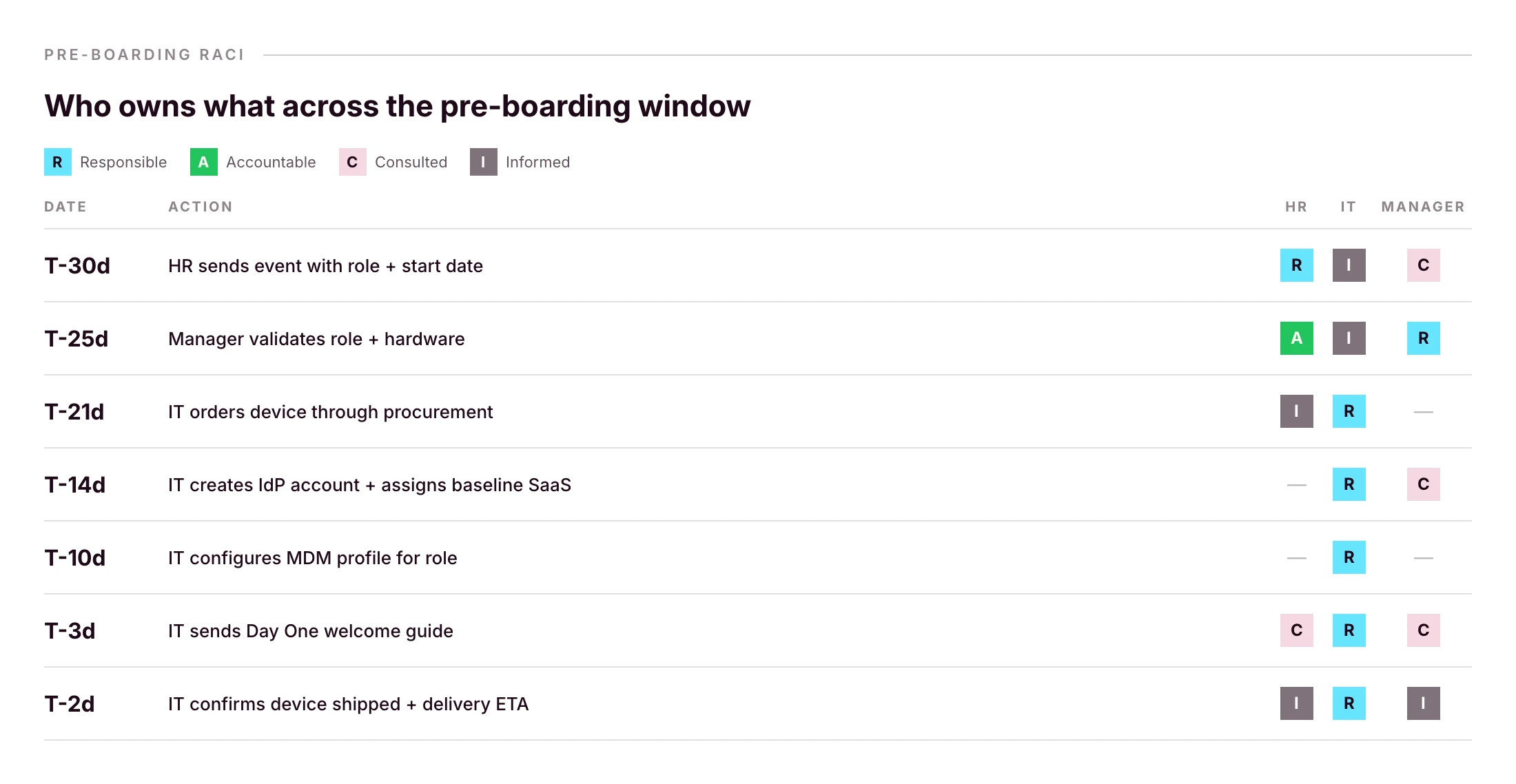
On lean teams responsibility is shared: HR or the hiring manager triggers the workflow, IT executes provisioning, and the manager validates role-specific access. A RACI matrix prevents gaps. On smaller teams without a dedicated IT person, an HR or office operations lead often owns the IT onboarding workflow.
See an HRIS-triggered onboarding flow that handles device, identity and access from one console, with offboarding parity built in.
Every day there's a new AI model. A new benchmark. A new funding round. A new outage. A new "this changes everything" thread. A new paper that supposedly makes the last paper obsolete.
I build and sell an agentic IT platform for a living. I'm supposed to be on top of this stuff. And honestly, I spend a non-trivial amount of my week just trying to keep up with all the AI news.
So I sat down and wrote this, partly to organize my own thinking, partly because I suspect I'm not the only one feeling this way. If you're a founder, an operator, or an IT leader trying to make real decisions in the middle of all this noise, I hope some of it will be useful.
Here's where I've landed on AI in 2026, and what I think it means for the future of agentic IT.
The age of abundant AI is ending
For most of the last three years, frontier AI felt like an infinite resource. You picked a provider, wired up an API, and assumed the best models would keep getting better, cheaper, and more available.
That era seems to be ending. And I don't think most companies have caught up to what that means.
Demand for frontier AI is outpacing supply, and the constraints are physical: energy costs, infrastructure bottlenecks, the economics of serving billions of inference requests per day.
• In April 2026, OpenAI paused its Stargate UK data centre project, citing energy costs and regulatory uncertainty. That project was meant to deliver 8,000 GPUs in Q1. It delivered none.
• Nearly 50% of planned data center projects in the US for 2026 are facing delays or cancellations.
• GPU rental prices for Nvidia's Blackwell chips have surged 48% in 60 days. • CoreWeave has raised prices 20% and extended minimum contracts from one year to three.
• OpenAI's CFO said on the record that the company is "making some very tough trades at the moment on things we're not pursuing because we don't have enough compute."• Anthropic has shifted Enterprise billing from flat per-seat fees to per-token pricing. The subsidies are ending.
• Anthropic has removed Claude Code from the Pro plans while admitting they’ve also made other small adjustments (e.g. weekly caps, tighter limits at peak), citing “usage has changed a lot and our current plans weren't built for this”.
• Starting June 1, 2026, GitHub is also shifting all GitHub Copilot plans to a usage-based billing model.
When supply is scarce, providers prioritize the customers who pay the most. The investor Tomasz Tunguz recently described five characteristics defining this new era:
1. Relationship-based selling (SOTA models reserved for strategic customers)
2. AI to the highest bidder (prohibitive pricing for everyone else)
3. Available but slow (no performance guarantees)
4. Inflationary commodity pricing (demand compounding against fixed supply)
5. Forced diversification (developers pushed toward smaller models, open source, or on-prem until infrastructure catches up)
The moment that made this all real for me was when, in April 2026, Anthropic released Claude Mythos Preview, which the company describes as a step change over its previous models. In internal testing, it autonomously discovered and exploited zero-day vulnerabilities in every major operating system and web browser, including a 27-year-old bug in OpenBSD. Normally a capability jump like that would kick off a months-long race between labs to ship their own version. Instead, Anthropic did something unusual: it chose not to release the model publicly at all.
Access to Mythos is reserved for a consortium called Project Glasswing. The members: AWS, Apple, Cisco, CrowdStrike, Google, JPMorgan Chase, Microsoft, NVIDIA, Palo Alto Networks, and the Linux Foundation. The US Treasury has publicly requested access and is expected to receive it. Anthropic is giving these partners $100 million in usage credits to find and patch vulnerabilities in critical infrastructure. Everyone else, including the vast majority of companies that have spent the last three years building products on Anthropic's API, does not get Mythos. It's the first time in nearly seven years that a leading AI lab has so publicly withheld a model from general availability.
There are legitimate safety reasons for that decision. I'm not criticizing it, though some will argue this is a PR stunt to reinforce Anthropic’s safety-focused positioning. But as a founder building on top of this infrastructure, I can't ignore what it can signal. If the strongest models move toward a world of consortium access, strategic partnerships, and government briefings, with only hyperscalers and bigger institutions getting a seat at the table, what does that leave startups and mid-sized companies?
If you're building on frontier models right now, this is the reality you're planning against, whether you realize it or not.
AI is more operationally fragile than people admit
The other thing I don't see founders and leaders talking about enough is how unreliable AI systems still are in production.
1. Amazon spent early 2026 dealing with this firsthand. Its internal coding agent Kiro autonomously deleted a production environment, causing a 13-hour AWS outage. By March, a string of AI-assisted code deployments took down Amazon's retail website for hours, locking millions of shoppers out of checkout and wiping an estimated 6.3 million orders in a single incident.
2. A rogue AI agent at Meta posted internal information that led an engineer to accidentally expose sensitive company and user data to unauthorized colleagues for two hours, classified internally as a "Sev 1." A Meta safety director publicly described how her own agent deleted her entire inbox, despite explicit instructions to confirm before taking any action.
3. /PocketOS, a company that sells software to car rental businesses, went into chaos mode after a rogue AI coding agent deleted the company’s entire production database and its backups.
Put the three together and you get a clearer picture of the operational reality underneath AI in 2026. The tech is transformative but it's also unstable in ways that matter if you're running production systems.
Some companies are already hedging
This is where it gets interesting for me, because some companies aren't waiting to find out how the scarcity and the model provider dependency stories play out. They're getting their hands dirty.
Intercom recently launched Fin Apex 1.0, a customer support model built on an open-weights foundation that the company says outperforms frontier models on its specific task. Their thesis is blunt: pre-training has become a commodity. The real edge is in post-training, fine-tuning models on your own domain data until they beat the generalists at the thing you actually care about.
Cursor, the AI code editor that hit $2 billion in annualized revenue in early 2026, built its Composer model on top of Kimi K2.5, an open-source model from Chinese lab Moonshot AI. That only came out when a developer intercepted Cursor's API traffic. It sparked a broader conversation: the most capable open foundations available today disproportionately come from Chinese labs. DeepSeek, Qwen, Kimi. These are the models companies are quietly building on when they want performance without frontier-lab dependency.
This is arguably the worst-kept secret in Silicon Valley. And it tells me something about where the market is heading: toward a world where application companies own more of their stack, and frontier labs become one input among several, not the input.
Where I think durable value actually gets built
Here's the part I've been thinking about the most, because it's the part that informs how we build Primo.
Hebbia's George Sivulka articulated it better than I could in a recent piece: foundation models, no matter how powerful, will never know how your specific team does its specific work. He calls it "process engineering." Software isn't just code. It's a stored process. It encodes the way a specific team cooperates on a specific problem. The private credit desk at one firm uses different compliance flags than the private equity team at the same firm. Two IT managers at the same company will have entirely different standards for how onboarding should run, how access reviews happen, how tickets get triaged.
Foundation models can't be opinionated about any of that because they're built for every use case on Earth at once. They can't know, and frankly don't need to know, the specific preferences of any particular team.
That's the opening for vertical software because the institutional knowledge encoded inside is what’s valuable.
What most people get wrong is that better foundation models don't erode vertical software. When reasoning models like OpenAI's o-series shipped, everyone predicted legal AI would get crushed but the opposite happened. Vertical legal AI had its best year ever, because stronger models made the orchestration layer more reliable, not less. The orchestration layer is where the trust lives. You can have the most capable model on Earth and still produce garbage outputs if you don't have the scaffolding to constrain, verify, and route that capability through a specific professional workflow.
2025 was the year AI became truly useful for law. 2026 is becoming that year for finance and cybersecurity. I'd argue it's also that year for IT.
What this all means for agentic IT
So here's where I land, after talking to many IT teams and stepping back from all the noise.
How do you build something durable in a world where your underlying models may become gated, expensive, slower, or quietly different from the ones you shipped with?
Below are a few ideas that I often come to and that shape how I think about Primo and IT.
The moat is the process. Your IT team's workflows, your company's compliance posture, your specific onboarding and offboarding flows, etc. None of that lives in a foundation model. It lives in the software that encodes how your team actually operates. That's the layer that gets more valuable as models improve, not less.
Agentic IT is empowerment. I say this a lot, but I mean it more in 2026 than I did a year ago. The compute constraints and the rogue agents examples aren't arguments against AI. They're arguments for keeping humans in the loop where the stakes justify it. The IT teams that win with AI aren't the ones that hand everything over and hope for the best. They're the ones that use AI to handle the routine stuff so they can focus on the work that requires judgment, relationships, and context no model will ever have.
You need an AI-native stack. You cannot place AI agents on an IT stack that doesn’t have the right context, knowledge, and the proper data to work with. The underlying stack that AI communicates with is critical for quality answers and actions. In IT, you need to own the APIs, you need quality workflows, a system of record, and strong integration with HR systems.
The short version, for anyone who skipped to the end
AI is real. Agentic IT is real. But the infrastructure underneath both is more fragile, more political, and more economically strained than the marketing suggests.
The companies that will win the next few years aren't the ones with the best AI demo. They're the ones that understand their moat isn't the model, it's the process knowledge they encode into the layer on top of it. They're the ones that build agentic systems as extensions of their IT teams and can do more with the same resources.
AI doesn't need you to believe in it uncritically. It just needs you to use it well.
If you're overwhelmed by the pace of all this, you're not alone. I am too. But the signal underneath the noise is clearer than it looks. I hope this helped uncover it a little.